

Vibe Island 1.0.41 for Mac

Vibe Island
Name:Vibe Island 1.0.41 [LOVE].dmg.torrent (31.3MB)
Hash:0f1f47ae7ce7bfe5e8e6c9b7e2fdb42355c77cfd
Review by:
Downloads 173
Rating
4.8 32 Click to rate
Checked
   Download Torrent Download Now

Vibe Island — notch dashboard for AI coding agents

A native macOS utility that parks a live status panel in the notch area so you can see every running AI coding session without cycling through terminal tabs.

If you run more than one CLI agent—Claude Code in iTerm2, Codex in Ghostty, Cursor Agent in the IDE terminal—each session can stall, finish, or ask for permission while you are focused elsewhere. Vibe Island watches those tools locally and surfaces working, waiting, and done states in one overlay that stays visible across Spaces and full-screen editors. The panel is designed to be non-activating: it informs you without stealing focus from the app you are editing in.

Setup and day-to-day workflow

On first launch the app auto-configures hooks for supported agents, so you are not hand-editing shell profiles for each CLI. Sessions appear as cards with color-coded status; when Claude Code, OpenCode, or MiMoCode requests a tool permission or AskUserQuestion prompt, the notch expands with Allow, Deny, or one-click answers. For other agents you still get live monitoring and 8-bit sound cues per event, then a precise jump to the exact terminal window, tab, split pane, or tmux session across 20+ terminals including iTerm2, Warp, WezTerm, Ghostty, and VS Code or Cursor integrated terminals.

Plan review renders Markdown in the panel when an agent proposes a multi-step plan, which helps you approve or redirect work before it runs. Usage tracking for providers such as Claude, Codex, and Kimi sits beside session status so you can route tasks to agents that still have headroom. SSH Remote monitoring lets a Mac on your desk watch agents running on a remote machine without sending session data through a cloud relay.

Privacy, hardware, and licensing

The vendor states that processing stays on your Mac: no cloud dashboard and no telemetry pipeline between your terminals and the overlay. The app is built in Swift, targets macOS 14 Sonoma or later on Intel and Apple Silicon, and is sized to use under 50 MB of RAM according to the product site. Distribution is direct download or Homebrew (brew install --cask vibe-island), not the Mac App Store. Licensing is a one-time purchase starting at $19.99 for one Mac (two- and three-Mac tiers exist), with a two-day free trial before activation.

Version 1.0.41

Release 1.0.41 (July 13, 2026) extends agent coverage and polish: Grok Build CLI support, Orca integration inside Stably’s agent IDE, herdr pane jumping, Quiet scenes for Focus and screen sharing, in-app device management, and reliability fixes for SSH, Cursor subagents, and session persistence after restart. It is a practical update if you already depend on the notch workflow or plan to run several agents in parallel on Sonoma or newer.
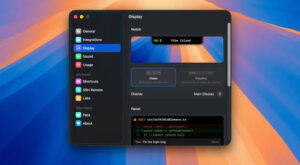
Vibe Island 1.0.41 for Mac — AI Agent Notch Monitor

Pros & Cons Show details

✅ PROS

  • Monitors 26 AI coding agents in one notch panel with live working, waiting, and done states across Spaces and full-screen apps.
  • GUI approval and AskUserQuestion handling for supported agents lets you respond without leaving the editor or terminal focus.
  • Precise terminal jump covers 20+ terminals plus tmux and split panes, which makes parallel agent workflows manageable.
  • Fully local operation with no cloud relay or telemetry, according to the vendor’s privacy positioning.
  • Native Swift footprint under 50 MB RAM on macOS 14+ suits long coding sessions on Intel and Apple Silicon Macs.
  • One-time $19.99 licensing with a two-day trial avoids subscription lock-in for a single-purpose developer utility.

❌ CONS

  • Requires macOS 14 Sonoma or later, so older Macs cannot run the app even if terminals work fine on earlier releases.
  • Two-way notch interaction is limited to a subset of agents; others still need a manual jump to the terminal to respond.
  • Not on the Mac App Store—updates rely on direct download or Homebrew, which some teams block in managed environments.
  • SSH Remote and multi-agent setups add configuration surface area that may take trial-and-error before everything is stable.
  • The two-day trial is short if you need time to validate every CLI and terminal combination in your stack.
  • Niche focus on AI coding CLIs offers little value if you do not run terminal-based coding agents daily.
✅ What's New in 1.0.41 Show details
  1. [Grok Build CLI support] — xAI’s terminal agent now appears on the island with live status, questions, and completion alerts.
  2. [Orca in Stably agent IDE] — Jump lands on the correct agent pane inside Stably, including across parallel worktrees.
  3. [herdr precise jump] — Notifications open the exact agent pane across tabs and workspaces in this tmux-style AI tool.
  4. [Quiet scenes] — The panel stays silent during Focus modes, screen lock, recording, or screen sharing.
  5. [Activated Mac management] — View every licensed device in Settings and deactivate hardware you no longer use.
  6. [Project name toggle] — Show or hide project names on session cards to reduce clutter or add context.
  7. [Subagent lifecycle reliability] — More stable status tracking across Claude, Codex, Antigravity, OpenCode, Pi, and others.
  8. [SSH reconnect fix] — Resolves a reconnect loop that could freeze the Mac during remote monitoring sessions.
  9. [Cursor ghost sessions fix] — Eliminates duplicate and phantom subagent entries after parallel or Rewind workflows.

Older Versions

Version Publication date
Vibe Island v1.0.41 Latest Current
Vibe Island v1.0.39
Vibe Island v1.0.37

Installation & Troubleshooting FAQ

8 questions

Common issues when installing macOS apps

Join the Conversation

Your email address will not be published. Required fields are marked *