A Better Finder Attributes 7.47 for Mac

A Better Finder Attributes
Name:A Better Finder Attributes 7 7.47 [TNT].dmg.torrent (15.14MB)
Hash:57523f9b7fbaf6451f631da092746d417c109fae
Review by:
Downloads 171
Rating
4.6 15 Click to rate
Checked
   Download Torrent Download Now

A Better Finder Attributes 7

A long-running Mac file-metadata utility from Public Space that batch-adjusts photo shooting dates, EXIF and IPTC tags, Finder sort dates, and filesystem flags when Apple’s built-in tools are too limited for large libraries.

Typical Mac workflow

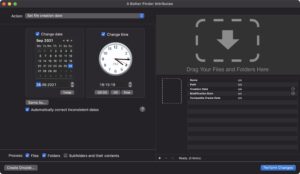
You drag folders of JPEG, RAW, or video files into the app or use Finder integration, then choose an action such as shifting EXIF DateTimeOriginal by a timezone offset, copying shooting dates into creation dates so albums sort correctly, or stripping GPS and camera data before client delivery. The preview pane shows embedded metadata so you can confirm tags before applying changes across hundreds or thousands of files.

Beyond photos, the tool can set or remove file creation and modification timestamps, extract dates embedded in filenames, copy dates from untouched originals in another folder tree, increment timestamps for scanned rolls, delete invisible files such as .DS_Store, and toggle Finder labels or extension visibility. Saved droplets let you drop future batches onto a small app that reruns the same recipe without reopening the full interface.

Licensing and version 7.47

A Better Finder Attributes sells for about $29.95 from the developer with a 30-day money-back guarantee, a free trial, and upgrade pricing for existing customers; it is distributed directly from publicspace.net, not the Mac App Store. Version 7.47 requires macOS 13 Ventura or later on Intel or Apple Silicon Macs and is listed as compatible with macOS 26 Tahoe. Build 7.47, released 13 July 2026, improves TIFF and XMP aware metadata stripping; an older 7.38 branch remains available for macOS 10.15 through macOS 15.

A Better Finder Attributes 7.47 — File Dates for Mac

Pros & Cons Show details

✅ PROS

  • Batch EXIF, IPTC, and filesystem date edits save hours when fixing camera clock errors or preparing large photo deliveries.
  • Copying shooting dates to Finder creation dates solves sorting problems that plain file timestamps cannot fix.
  • Filename date extraction and incremental timestamp tools help scanned libraries without embedded EXIF.
  • Droplet automation repeats common metadata recipes with drag-and-drop convenience.
  • One-time purchase with a trial and long version history suits photographers who prefer ownership over subscription utilities.

❌ CONS

  • Version 7.47 is a narrow metadata-stripping update rather than a major feature release.
  • The current 7.x line requires macOS 13 or later; users on older macOS must stay on the separate 7.38 branch.
  • Direct sales only through publicspace.net may be inconvenient on Macs restricted to the App Store.
  • The interface and action list can feel dense to casual users who only need a one-off date change.
  • macOS 15 Sequoia and later may flag saved droplets as damaged until reconfigured, per the vendor’s Sequoia guidance.
✅ What's New in 7 7 47 Show details
  1. TIFF-aware stripping — Version 7.47 improves metadata stripping behavior for TIFF image files per official release notes.
  2. XMP-aware stripping — The 7.47 build also refines stripping when XMP sidecar or embedded XMP metadata is present.
  3. Release 13 July 2026 — Public Space published A Better Finder Attributes 7.47 on 13 July 2026 on its version history page.
  4. Current download build — The product and version pages list 7.47 as the current Intel and Apple Silicon release for macOS 13+.
  5. macOS 26 compatibility — The vendor continues to document macOS 26 Tahoe compatibility for the 7.47 line.
  6. Focused maintenance update — Version 7.47 centers on metadata-removal accuracy rather than new batch actions beyond the 7.46 parent-folder date feature.

Older Versions

Version Publication date
A Better Finder Attributes v7 7 47 Latest Current
A Better Finder Attributes 7 v7 7 45
A Better Finder Attributes 7 v7 7 43
A Better Finder Attributes 7 v7 7 42
A Better Finder Attributes 7 v7 7 41
A Better Finder Attributes 7 v7 7 40
A Better Finder Attributes 7 v7 7 39
A Better Finder Attributes 7 v7.04b03 v7 7 04b03
A Better Finder Attributes 7 v7.02b01 v7 7 02b01
A Better Finder Attributes 7 v7.00b05 v7 7 00b05
A Better Finder Attributes 7 v7.00b04 v7 7 00b04
A Better Finder Attributes 7 v7.00b03 v7 7 00b03
A Better Finder Attributes 7 v7.00b02 v7 7 00b02
A Better Finder Attributes 7 v7.00b01 v7 7 00b01
A Better Finder Attributes v7.36
A Better Finder Attributes v7.30
A Better Finder Attributes v7.29
A Better Finder Attributes v7.28
A Better Finder Attributes v7.21
A Better Finder Attributes 7 v7.7.38
A Better Finder Attributes 7 v7.7.35
A Better Finder Attributes 7 v7.7.34
A Better Finder Attributes 7 v7.7.32
A Better Finder Attributes 7 v7.7.31
A Better Finder Attributes 7 v7.7.25
A Better Finder Attributes 7 v7.7.24
A Better Finder Attributes 7 v7.7.23
A Better Finder Attributes 7 v7.7.22
A Better Finder Attributes 7 v7.7.20
A Better Finder Attributes 7 v7.7.19.2
A Better Finder Attributes 7 v7.7.19
A Better Finder Attributes 7 v7.7.18
A Better Finder Attributes 7 v7.17 fix v7.7.17
A Better Finder Attributes 7 v7.7.17
A Better Finder Attributes 7 v7.7.16
A Better Finder Attributes 7 v7.7.15
A Better Finder Attributes 7 v7.7.14
A Better Finder Attributes 7 v7.7.13
A Better Finder Attributes 7 v7.7.12
A Better Finder Attributes 7 v7.7.11
A Better Finder Attributes 7 v7.7.10
A Better Finder Attributes 7 v7.7.07
A Better Finder Attributes 7 v7.7.06
A Better Finder Attributes 7 v7.7.05
A Better Finder Attributes v7.04
A Better Finder Attributes v7.03
A Better Finder Attributes v7.02
A Better Finder Attributes v7.01
A Better Finder Attributes v7.0.9
A Better Finder Attributes v7.00.2
A Better Finder Attributes v7.00
A Better Finder Attributes v6.21
A Better Finder Attributes 6 v6.6.23

Installation & Troubleshooting FAQ

8 questions

Common issues when installing macOS apps

Alternatives

Join the Conversation

Your email address will not be published. Required fields are marked *