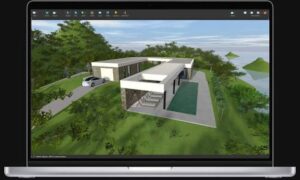
Live Home 3D Pro
A cross-platform home, interior, and landscape design application from Belight Software that lets Mac users draft floor plans in 2D, furnish spaces in 3D, and produce renders without switching to a separate CAD suite.
Typical Mac workflow
You start with a 2D plan: draw walls, set room dimensions, add doors and windows, then switch to a 3D walkthrough to place furniture, materials, and lighting. The catalog includes thousands of supplied objects and materials, and you can import models from Trimble 3D Warehouse or common 3D formats. Ray-traced stills and videos use offline engines such as AMD Radeon ProRender or Cycles, with geolocation-based sun and adjustable fixtures for more realistic exterior and interior shots.
Pro unlocks tools aimed at serious layouts: terrain editing for gardens and driveways, a material editor, 2D elevation views for wall openings, freely shaped roofs, a building-block tool for structural elements, extended camera controls, and exports to USDZ, glTF, FBX, OBJ, and other formats at higher resolutions. Projects can sync across Mac, iOS, iPadOS, visionOS, and Windows according to the vendor, though Mac App Store purchases do not transfer to other platforms.
Licensing and version 4.12.1
The base Mac app is free with watermarks, a one-project limit, and a two-floor cap until you buy Standard or Pro features via in-app purchase or a license from the developer site. On the Mac App Store, Pro is offered as subscriptions (about $14.99/month or $39.99/year) or a $99.99 lifetime unlock, with Standard tiers below that. Version 4.12 raised the minimum OS to macOS 11 on Apple silicon or Intel; 4.12.1 adds Polish UI localization, expanded Help translations, improved Collada import, roofing-material fixes, and general stability work.