
Termius 9.40.1 for Mac

Termius
Name:Termius 9.40.1.dmg.torrent (228.45MB)
Hash:b00dc502feb005a447fa47d8a0ab15b7ed9d79b9
Review by:
Downloads 129
Rating
4.8 32 Click to rate
Checked
   Download Torrent Download Now

Termius

A modern SSH and terminal client from Termius Corporation for macOS that organizes servers, keys, and credentials in vaults while supporting SSH, SFTP, Telnet, Mosh, port forwarding, and local shell tabs in one interface.

Typical Mac workflow

You save hosts in groups with tags, jump hosts, and shared credentials, then open multiple terminal tabs with syntax highlighting, shell history, and AI-powered Helium autocomplete for paths and passwords. Built-in SFTP handles file transfers in the same window; port forwarding and agent forwarding suit tunneling into private networks. Touch ID or Face ID can lock the app and protect stored keys on a Mac.

The free Starter plan keeps a local vault for personal homelab use. Pro ($10 per month billed annually) adds a personal cloud vault and sync across Mac, Windows, Linux, iOS, and Android, plus snippets and log bookmarks. Team and Business tiers add encrypted team vaults, real-time collaboration, session logs, and granular access control for operations staff. Direct SSH connections still work without cloud dependency when you use local-only storage.

Licensing and version 9.40.1

Termius installs from the Mac App Store or termius.com and requires macOS 10.13 High Sierra or later on Intel or Apple Silicon Macs. Version 9.40.1 is a maintenance release: the Mac App Store notes fixes for session logging reliability, faster handling of large host and group lists, and general stability improvements. The public docs changelog at docs.termius.com currently lists 9.39.0 as the latest detailed entry, so per-build notes for 9.40.1 come from the App Store listing.
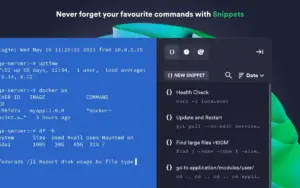
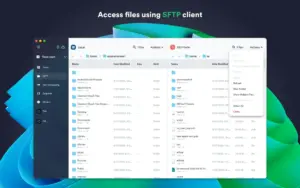
 Termius 9.40.1 is a cross-platform SSH, SFTP, and terminal client Termius 9.40.1 — SSH Client & Terminal for Mac

Pros & Cons Show details

✅ PROS

  • Unified SSH, SFTP, Mosh, and port forwarding in one polished client beats juggling Terminal, scp, and separate SFTP apps.
  • Host grouping, tags, and search scale better than flat lists when you manage dozens or hundreds of servers.
  • Cross-platform sync on Pro and Team plans keeps hosts and keys consistent between Mac, mobile, and desktop.
  • Free Starter tier with a local vault is usable for personal labs without a subscription.
  • Touch ID, Face ID, FIDO2, and SSH ID support align with modern Mac authentication expectations.

❌ CONS

  • Version 9.40.1 is a bug-fix release with no new features documented on the Mac App Store.
  • Cloud sync, snippets, and team vaults require paid Pro, Team, or Business subscriptions.
  • The official web changelog has not been updated for 9.40.x yet, so detailed release notes lag the App Store.
  • Some advanced team features (session log retention, multiplayer terminals) are locked to higher tiers.
  • Requires a Termius account for sync and collaboration; purely offline users may prefer plain OpenSSH in Terminal.
✅ What's New in 9.40.1 Show details
  1. Session logging fixes — Fixed several issues affecting session logging reliability in version 9.40.1.
  2. Large inventory performance — Improved app performance when working with many hosts and groups.
  3. Stability improvements — Other stability fixes ship in the 9.40.1 build per App Store release notes.
  4. Maintenance scope — No new features are listed for 9.40.1; this follows the 9.40.0 line as a patch release.
  5. Prior SSH ID removal (9.39.0) — Version 9.39.0 added the ability to remove SSH ID; that remains available in 9.40.1 but is not new in this build.
  6. Prior macOS display fix (9.39.0) — Version 9.39.0 fixed terminal tab selection in full-screen mode on external displays; included in the current codebase.

Older Versions

Version Publication date
Termius v9.40.1 Latest Current
Termius v9.35.4
Termius v9.29.0

Installation & Troubleshooting FAQ

8 questions

Common issues when installing macOS apps

Alternatives

Important

Run the downloaded image and drag the app to the Applications folder shortcut.

Once the copy is complete, you can launch the app from Launchpad.

If you see a pop-up asking you to purchase something, simply ignore it.

Compatibility
macOS 10.13 and later

Architecture
ARM, x86 (64-bit)

Join the Conversation

Your email address will not be published. Required fields are marked *