
Storyist 4.4.1 for Mac

Storyist for Mac
Name:Storyist 4.4.1 [TNT].dmg.torrent (24.29MB)
Hash:2395faf3daf0b2fdb69d014af868911479616146
Review by:
Downloads 209
Rating
4.3 19 Click to rate
Checked
   Download Torrent Download Now

Storyist

A macOS writing environment aimed at novelists and screenwriters who want manuscript formatting, story planning, and long-form organization in one project file instead of juggling a word processor and separate outliner.

Typical Mac workflow

You start from a template—novel, screenplay, or your own—and build the story on index cards and customizable plot, character, and setting sheets while the main editor handles rich text, comments, images, headers, footers, and style sheets. Tab-and-return shortcuts switch screenplay elements; the outliner and corkboard give a high-level view when you need structure before or during drafting. Project search, snippets, word-count goals, and autosave with macOS Versions keep daily writing sessions predictable on a single Mac or across machines when projects live in iCloud.

When a draft is ready, Storyist exports submission-oriented formats: print-ready PDF through the book editor, plus ePub and Kindle editions. Imports cover RTF, Word, Scrivener, Fountain, and Final Draft FDX, which helps if you are moving from another toolchain or sharing with a production partner. A companion Storyist app on iPhone and iPad lets you review and revise on the go, though the iOS build is sold separately from the Mac license.

Licensing and version 4.4.1

Storyist 4 requires macOS 10.14 Mojave or later and runs on Intel and Apple Silicon Macs. You can download a 14-day trial from the developer site or the Mac App Store; after the trial, viewer mode remains free and editing unlocks with a one-time purchase (about $59 on the website or via in-app purchase, with upgrade pricing for Storyist 3 owners). Version 4.4.1 is a small maintenance update: the Mac App Store notes that the “show invisible characters” preference now persists when moving between files in a project and lists minor macOS 26 compatibility tweaks. The public changelog on storyist.com currently ends at 4.4 (November 2025), which addressed Scrivener v2 image imports and a macOS Tahoe navigation-bar crash.
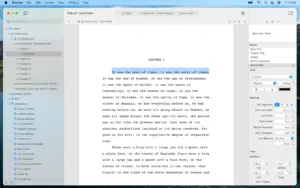
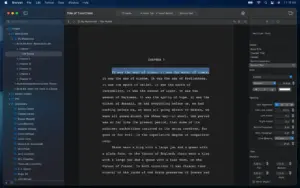
Storyist 4.4.1 is a Mac writing studio for novels Storyist 4.4.1 — Novel & Screenplay Writing for Mac

Pros & Cons Show details

✅ PROS

  • Combines long-form writing, corkboard planning, and screenplay formatting in one native Mac project instead of separate apps.
  • Imports Scrivener, Final Draft, Fountain, and Word files so switching from common writer tools does not require a manual rebuild.
  • One-time license with a 14-day trial and no subscription, plus free read-only viewer mode after the trial expires.
  • Exports PDF, ePub, and Kindle from the same manuscript workflow used for daily drafting and outlining.
  • iCloud-backed projects pair with Storyist for iOS for review and light editing away from the desk when you also own the mobile app.

❌ CONS

  • Version 4.4.1 changes only two documented items, so it is a patch release rather than a feature update.
  • The developer’s web release-notes page has not been updated for 4.4.1 yet, so Mac App Store “What’s New” is the primary source for this build.
  • The Mac App Store listing is English-only and does not declare accessibility support at the time of writing.
  • The iOS companion app is a separate purchase, so full cross-device writing costs more than the Mac license alone.
  • Less ecosystem depth than Scrivener or Ulysses for plugins, collaboration, and third-party integrations some power users expect.
✅ What's New in 4.4.1 Show details
  1. Invisible characters persistence — The show invisible characters setting now remains enabled when you navigate to other files within the same project.
  2. macOS 26 compatibility — Minor macOS 26.0 compatibility enhancements are included in the 4.4.1 build per the App Store notes.
  3. Maintenance release — 4.4.1 is a small follow-up to 4.4 with no new planning or export features advertised.
  4. Prior Scrivener image import (4.4) — Version 4.4 fixed cases where images failed to import from Scrivener version 2 projects; that fix remains in 4.4.1.
  5. Prior Tahoe navigation crash (4.4) — Version 4.4 worked around a macOS Tahoe bug that could crash Storyist when clicking a file title in the navigation bar.
  6. Prior macOS 26 Tahoe support (4.4) — Version 4.4 added broader macOS 26 Tahoe support; 4.4.1 layers additional minor compatibility tweaks on top.

Older Versions

Version Publication date
Storyist v4.4.1 Latest Current
Storyist v4.4.0
Storyist v4.3.9
Storyist v4.3.8
Storyist v4.3.7
Storyist v4.3.6
Storyist v4.3.4
Storyist v4.3.3
Storyist v4.3.2
Storyist v4.3.1
Storyist v4.3
Storyist v4.2.5
Storyist v4.2.4
Storyist v4.2.3
Storyist v4.2.2
Storyist v4.2.1
Storyist v4.2
Storyist v4.1.2
Storyist v3.3

Installation & Troubleshooting FAQ

8 questions

Common issues when installing macOS apps

Alternatives

Join the Conversation

Your email address will not be published. Required fields are marked *