NotchNook
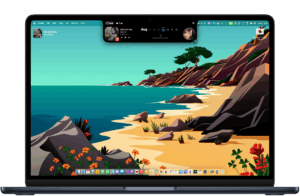
A macOS utility from lo.cafe that expands the MacBook notch—or a slim handler on notchless and external displays—into an interactive strip for widgets, live activities, media controls, and a temporary files shelf.
How it works day to day
NotchNook sits at the top center of your screen and responds to hover, click, and swipe gestures. The expanded “Nook” area can show widgets such as universal media controls, calendar events, Shortcuts, notes, a webcam mirror, timers, and to-do lists, depending on how you configure the layout. Live Activities can surface now-playing audio, battery changes, Bluetooth connections, and calendar transitions without opening separate apps.
The Files Tray turns the notch into a short-term drop zone: drag files onto the bar to hold them, paste from the clipboard, stack multiple items, or send content through AirDrop. On Macs without a hardware notch, NotchNook renders a transparent or pill-shaped handler with the same functions, and the vendor states support for multiple monitors.
Licensing and distribution
NotchNook is sold directly from lo.cafe, not the Mac App Store—the developer has cited private macOS APIs for system-wide media control as the reason. Pricing is typically a monthly subscription (two devices) or a one-time license (five devices) according to third-party reviews; the official site documents a 15-day refund window and license recovery. The app is also listed on Setapp as an alternative access path.
Requirements and version 1.6.2
The Sparkle feed lists macOS 14.6 as the minimum version for current builds. Version 1.6.2 (June 2026) is a small maintenance update that restores default gesture settings; larger 1.6.x additions such as Timer and To-do widgets shipped in earlier 1.6.0–1.6.1 releases on the same appcast.