Metadatics 1.7.3 for Mac

Metadatics for Mac
Name:Metadatics 1.7.3 [TNT].dmg.torrent (17.8MB)
Hash:95e9de005983d5607d6224276a1636a084aaf14c
Review by:
Downloads 206
Rating
4.5 15 Click to rate
Checked
   Download Torrent Download Now

Metadatics

A native macOS audio metadata editor for cleaning up large music libraries—edit tags, artwork, and filenames across hundreds or thousands of tracks in one spreadsheet-style workflow.

How it fits a Mac music library

If you collect FLAC rips, old MP3 folders, AAC purchases, or mixed-format archives, tags often drift out of sync: missing album art, wrong track numbers, inconsistent artist spelling, or filenames that no longer match the metadata inside each file. Metadatics opens common audio formats—including MP3, M4A, AIFF, WAV, FLAC, APE, OGG, and WMA—and lets you inspect and change ID3, MP4, Vorbis, APE, and ASF tags from a single table view instead of opening tracks one by one in another app.

The typical workflow starts by adding files or folders, reviewing columns for artist, album, title, genre, year, and artwork, then applying edits to the selection or the whole list. Built-in functions replace text, trim characters, renumber tracks, copy values between fields, and fix common formatting issues without writing scripts. When you need outside data, MusicBrainz lookup can fill gaps, and artwork tools support reading, writing, resizing, and extracting cover images—including multiple images per file where the format allows.

Batch rename and library structure

After tags are correct, Metadatics can generate directory layouts and rename files from metadata patterns, which is useful when moving a messy download folder into a Plex-, iTunes-, or player-friendly tree. Because changes apply in bulk, you can standardize a discography or podcast archive in one session rather than repeating the same edits manually.

Licensing and platform notes

Metadatics is sold as a one-time purchase on the Mac App Store by Mark V Apps and requires macOS 11.5 or later according to the current listing. It is focused on tag editing and file organization—not playback, DJing, or format conversion—so it pairs well with dedicated players or library managers. Version 1.7.3 is a small maintenance update; the core value remains fast batch metadata work on Mac.
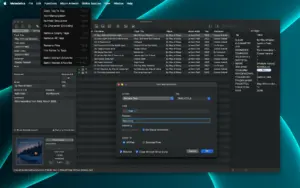
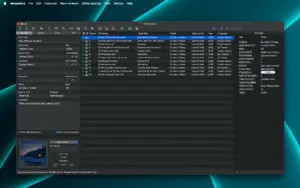
Metadatics 1.7.3 batch-edits MP3, FLAC, M4A tags on Mac Metadatics 1.7.3 — Audio Metadata Editor for Mac

Pros & Cons Show details

✅ PROS

  • Spreadsheet-style batch editing lets you fix tags across many files at once instead of opening each track separately.
  • Broad format and tag support covers MP3, M4A, FLAC, OGG, and more with ID3, MP4, Vorbis, APE, and ASF metadata.
  • Built-in transformation functions handle renumbering, text replacement, and field copying without custom scripts.
  • MusicBrainz lookup and artwork tools reduce manual typing when rebuilding incomplete album metadata.
  • File rename from metadata helps align filenames and folder structures with corrected tags after a cleanup pass.

❌ CONS

  • One-time Mac App Store purchase (around $15 in the U.S.) with no free tier for large libraries.
  • Requires macOS 11.5 or later, so older Macs below that floor cannot install the current build.
  • No built-in audio playback or conversion; you still need other apps for listening or transcoding.
  • Online lookups depend on external services such as MusicBrainz, which may be incomplete for obscure releases.
  • Interface depth and column-heavy layout can feel dense compared with simpler single-file tag editors.
✅ What's New in 1.7.3 Show details
  1. Drag-to-reorder fix — Corrects an issue when reordering files by dragging, so manual sort order stays reliable before batch edits or renames.
  2. MP4 four-character tag write fix — Fixes writing certain four-character tags in MP4/M4A files where short metadata keys failed to save.
  3. AAC and MP4 library saves — Improves reliability when batch-editing iTunes-style containers that use compact tag identifiers.
  4. Additional minor fixes — Vendor release notes mention other small bug fixes without public detail; expect general edge-case stability.
  5. June 2026 maintenance build — Version 1.7.3 continues the 1.7.x polish cycle on macOS 11.5+ without major new features.

Older Versions

Version Publication date
Metadatics v1.7.3 Latest Current
Metadatics v1.7.2
Metadatics v1.6.15
Metadatics v1.6.13
Metadatics v1.6.11
Metadatics v1.6.10
Metadatics v1.6.9
Metadatics v1.6.8
Metadatics v1.6.6
Metadatics v1.6.6
Metadatics 1.6.5 (304) v1.6.5.304
Metadatics v1.6.5
Metadatics v1.6.3
Metadatics v1.6.2
Metadatics v1.6.1
Metadatics v1.5.7

Installation & Troubleshooting FAQ

8 questions

Common issues when installing macOS apps

Alternatives

Join the Conversation

Your email address will not be published. Required fields are marked *