iBarcoder 3.18.0 for Mac

iBarcoder
Name:iBarcoder 3.18.0 [TNT].dmg.torrent (17.71MB)
Hash:d86a711fbe30f75e416c3249f07312875a9eb154
Review by:
Downloads 224
Rating
4.6 30 Click to rate
Checked
   Download Torrent Download Now

iBarcoder

A Mac-native barcode generator and label designer from Cristallight Software that creates individual or sequential codes, lays them out on Avery or custom sheets, and prints or exports production-ready graphics without a separate desktop publishing suite.

Typical Mac workflow

Open iBarcoder, pick a symbology—QR Code, UPC-A, EAN-13, ISBN, Code 128, GS1-128, Data Matrix, PDF417, or dozens of postal and logistics formats—and type or import the data. A live preview updates as you change size, rotation, colors, and human-readable text. Add text boxes, logos, borders, and images on a label canvas, then print directly to inkjet, laser, or thermal printers using built-in Avery presets (about 1,000 formats per the vendor) or your own custom sheet definition. For catalogs and inventory, Counter mode increments numbers automatically; Text File mode reads sequential values from .txt or Excel .xlsx workbooks.

Export and design options

Finished barcodes export as high-resolution raster files (PNG, TIFF, JPEG, BMP) up to 4800 dpi or as vector PDF and EPS for Illustrator and InDesign workflows. RGB and CMYK export modes help avoid color-shift surprises in print shops. Contacts integration can encode vCard, meCard, or xCard data into QR and DataMatrix codes. QR logos with opacity and scale controls support marketing labels that remain scannable when sized correctly.

Licensing and platform support

The full app costs $49.99 on the Mac App Store with Family Sharing; Cristallight also offers a direct download with a free trial and free updates for purchased licenses. macOS 10.15 Catalina or later is required; version 3.18.0 is listed as ready for macOS 26 Tahoe on the developer site. A separate iBarcoder Lite app on the App Store provides a reduced feature set with in-app purchases for additional symbologies.

Version 3.18.0

Release 3.18.0 (June 2026) is a maintenance-focused build. Mac App Store notes cite general functionality improvements and UI changes without itemizing specific symbologies or bug IDs. The developer website bumps the current download to 3.18.0 with Tahoe compatibility messaging; users upgrading from 3.17.x should expect polish rather than major new barcode types—RM4SCC support arrived in the 3.17.3 line per earlier release history.
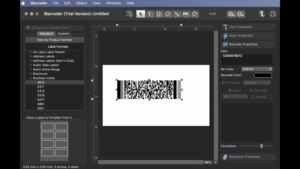

iBarcoder 3.18.0 for Mac — Barcode & Label Maker

Pros & Cons Show details

✅ PROS

  • Support for roughly 60 linear and 2D symbologies covers retail UPC/EAN, publishing ISBN, logistics GS1-128, and QR/Data Matrix in one Mac tool.
  • Built-in Avery label templates and custom sheet definitions let you design and print barcoded stickers without re-measuring margins in another app.
  • Bulk generation from Excel or text files plus Counter mode suits inventory batches, asset tags, and catalog numbering workflows.
  • Vector PDF/EPS and high-DPI raster export integrate cleanly with Illustrator, InDesign, and commercial print pipelines.
  • One-time $49.99 App Store purchase with no subscription compares favorably with cloud barcode services for shops that print locally.

❌ CONS

  • Version 3.18.0 publishes only vague release notes (“functionality improved, UI changes made”), so you cannot audit exact fixes before upgrading.
  • The Mac App Store listing’s “What’s New” section historically lagged major versions, which makes patch tracking harder than on the Cristallight direct download page.
  • Advanced layout and sequential import features have a learning curve compared with simple single-code QR generators.
  • iBarcoder Lite offers a cheaper entry path but locks many symbologies behind in-app purchases, which can confuse buyers who pick the wrong edition.
  • Barcode quality still depends on printer calibration and label stock; the app cannot compensate for poor thermal printer maintenance or non-standard label sizes without manual tuning.
✅ What's New in 3.18.0 Show details
  1. General functionality — version 3.18.0 improves underlying barcode and label operations per Mac App Store release notes, without a public list of specific modules changed.
  2. UI refinements — the 3.18.0 update includes interface changes aimed at a cleaner workspace, according to the developer’s brief App Store description.
  3. macOS 26 readiness — Cristallight lists 3.18.0 as ready for macOS 26 (Tahoe) alongside macOS 10.15 through current releases on the product download page.
  4. RM4SCC symbology — release 3.17.3 in the prior line added RM4SCC postal barcodes; that capability ships in the 3.18.0 build users receive when updating from older 3.17.x installs.
  5. KIX and Identcode support — the current App Store feature list includes RM4SCC, KIX, Identcode, and Leitcode among supported types in the maintained 3.18 product line.
  6. Stability line from 3.17.6 — third-party summaries of 3.17.6 cited performance and macOS compatibility work that remains part of the codebase leading into 3.18.0.

Older Versions

Version Publication date
iBarcoder v3.18.0 Latest Current
iBarcoder v3.17.12
iBarcoder v3.17.7
iBarcoder v3.17.6
iBarcoder v3.17.5
iBarcoder v3.17.4
iBarcoder v3.17.3
iBarcoder v3.17.2
iBarcoder v3.17.1
iBarcoder v3.17.0
iBarcoder v3.16.12
iBarcoder v3.16.11
iBarcoder v3.16.9
iBarcoder v3.16.7
iBarcoder v3.16.6
iBarcoder v3.16.5
iBarcoder v3.16.4
iBarcoder v3.16.3
iBarcoder v3.16.0
iBarcoder v3.15.11
iBarcoder v3.15.10
iBarcoder v3.15.9
iBarcoder v3.15.8
iBarcoder v3.15.7
iBarcoder v3.15.6

Installation & Troubleshooting FAQ

8 questions

Common issues when installing macOS apps

Alternatives

Join the Conversation

Your email address will not be published. Required fields are marked *