
EzyCal 2.6 for Mac

EzyCal: Time & Date
Name:EzyCal 2.6 [TNT].dmg.torrent (6.78MB)
Hash:a91f004d08db177964405e7b29eabe20a89da44a
Review by:
Downloads 101
Rating
4.6 21 Click to rate
Checked
   Download Torrent Download Now

What EzyCal does on Mac

EzyCal is a lightweight menu bar calendar for macOS that shows upcoming events, reminders, and to-do items while syncing with the calendars you already use in Apple Calendar.

Developed by AppYogi Software, EzyCal sits in the status bar so you can open a compact calendar window without leaving your current app. It supports natural-language event and reminder creation, a seven-day event list, countdown timers to keep deadlines visible, and customization for status bar date display, themes, window size, and keyboard shortcuts. Events you add in EzyCal sync with system calendars, and data from iCloud, Google, Exchange, or other accounts configured in Calendar.app appears in the app.

Typical Mac workflow

After granting Calendar access, you click the menu bar icon to review today and the next week, add a quick reminder, or check countdowns to meetings. The Today extension surfaces upcoming items in Notification Center. Dark Mode, multiple color themes, and three window sizes help the panel fit different displays from MacBook Air to external monitors. A global shortcut can open the calendar instantly when you need to schedule without opening the full Calendar app.

Version 2.6

Released June 15, 2026, build 2.6 is a maintenance update. AppYogi’s Mac App Store notes list support for macOS 26 Tahoe, improved performance, and bug fixes. The developer did not publish a detailed per-issue changelog on its website, so this release appears focused on compatibility and stability rather than major new features.

Licensing and requirements

EzyCal requires macOS 10.11 or later according to the Mac App Store and costs $9.99 as a one-time purchase with Family Sharing. A free trial is available from AppYogi’s website for the direct-download build. The app collects diagnostics and identifiers not linked to your identity per the App Store privacy label.
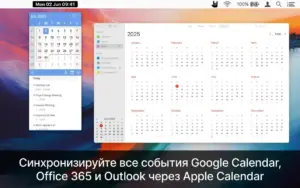
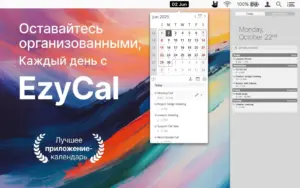
EzyCal 2.6 is a Mac menu bar calendar that syncs EzyCal 2.6 for Mac — Menu Bar Calendar

Pros & Cons Show details

✅ PROS

  • EzyCal keeps calendar, reminders, and to-dos in the menu bar so you can check your schedule without switching to the full Calendar app.
  • Two-way sync with Apple Calendar means events from iCloud, Google, Exchange, and other configured accounts appear in one compact view.
  • Customizable status bar display, themes, window sizes, and keyboard shortcuts let you tailor the panel to different Mac setups and workflows.
  • Version 2.6 adds macOS 26 Tahoe compatibility, which matters if you run the latest macOS release on a new Mac.
  • The $9.99 one-time App Store price avoids a subscription for a focused menu bar utility with Family Sharing support.

❌ CONS

  • Version 2.6 only documents Tahoe support, performance tweaks, and unspecified bug fixes, not substantial new planning or calendar features.
  • AppYogi did not publish a detailed changelog beyond the generic App Store summary, so individual fixes are unknown.
  • EzyCal depends on Apple Calendar for sync; if Calendar permissions break or accounts fail to sync system-wide, EzyCal reflects the same gaps.
  • The app is Mac-only and menu-bar focused, so users who need full project management or team scheduling will outgrow it quickly.
  • Some competing menu bar calendars offer richer widgets, weather, or meeting integrations that EzyCal does not emphasize in its feature set.
✅ What's New in 2.6 Show details
  1. [Changelog scope] — AppYogi published only a brief Mac App Store summary for 2.6; no detailed release notes page was available on the developer site.
  2. [macOS 26 Tahoe support] — The app is updated for macOS 26 Tahoe so the menu bar calendar and reminders remain compatible on the latest macOS release.
  3. [Performance improvements] — AppYogi reports general performance improvements in this build compared with the previous public version.
  4. [Bug fixes] — Unspecified bug fixes address stability issues since the prior release, though individual issues were not listed publicly.
  5. [Maintenance release pattern] — Like version 2.4 before it, 2.6 focuses on OS compatibility and polish rather than adding major new calendar or task-management features.

Older Versions

Version Publication date
EzyCal v2.6 Latest Current
EzyCal v2.4
EzyCal v2.3
EzyCal v2.2
EzyCal v2.1
EzyCal v2.0

Installation & Troubleshooting FAQ

8 questions

Common issues when installing macOS apps

Alternatives

Join the Conversation

Your email address will not be published. Required fields are marked *