
Bloom 1.5.35 for Mac

Bloom
Name: Bloom 1.5.35 [EDiSO].dmg.torrent (14.81MB)
Version: 1.5.35
Operating System: macOS
Program license: Free
Developer: Sad Cat Software
Interface language: English
Review by:
Downloads 551
Rating
4.6 25 Click to rate
Checked
   Download Torrent Download Now

A Finder-style file manager built for productivity

Bloom is a native macOS file manager that reimagines Finder with multi-pane layouts, fast search, workspaces, and tools for batch file work without leaving one window.

Multi-pane and workspace workflow

Instead of juggling several Finder windows, Bloom lets you open two, three, or more panes in a single window and save layouts as Workspaces for different projects. Sync browsing keeps related folders visible side by side, while column auto-resize shows full filenames without manual dragging.

  • Developers and designers: move assets between project folders with Portal and pinned mini-windows.
  • Power users: batch rename, tag files, browse archives without extracting, and revert changes via Footprints.
  • Everyday Mac use: system-wide Go to Folder, live folder search, and iCloud or cloud-drive browsing.

Search, preview, and safety

Press Command-F to filter the current folder or use the global navigation panel for path jumps and keyword search across predefined locations. The inspector previews archives, images, and documents, while Footprints records file operations so deletions and renames can be undone.

Licensing and privacy

Bloom sells as a one-time purchase with a 7-day trial and free updates according to the developer. The app runs offline and does not collect personal data; some tag features may require Full Disk Access in System Settings.

Bloom 1.5.35

Version 1.5.35 requires macOS 14.0 or later on Intel and Apple Silicon Macs and adds sidebar and path bar color options, tag assignment from the right-click menu, preview date editing, and AppleScript layout control documented in the official changelog.
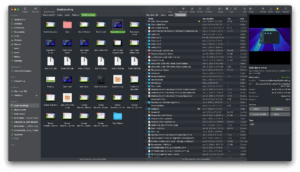

Bloom 1.5.35 for Mac — Refined File Manager

Pros & Cons Show details

✅ PROS

  • Multi-pane layouts and saved Workspaces reduce window clutter compared with managing several Finder windows for the same copy-and-move tasks.
  • System-wide Go to Folder, live in-folder search, and fast keyword search help you reach files quickly without relying solely on Spotlight.
  • Footprints records file operations and supports undo, which lowers the risk of irreversible mistakes during batch renames or large moves.
  • Portal, sync browsing, advanced rename, archive preview, and image tools address common power-user gaps in the stock Finder.
  • One-time pricing with a 7-day trial and stated free future updates offers clear value against subscription-based utility apps.
  • Version 1.5.35 expands UI customization with sidebar and path bar colors plus more toolbar styles for a personalized workspace.
  • The developer states Bloom runs offline without collecting personal data, which suits privacy-conscious local file management.

❌ CONS

  • Bloom is Mac-only and requires macOS 14.0 or later, so it cannot replace Finder on older Macs or other operating systems.
  • The app is not distributed on the Mac App Store; you install it from the developer site or Homebrew, which may matter for managed or locked-down Mac environments.
  • Multi-pane power features and configurable shortcuts carry a learning curve for users accustomed to basic Finder habits.
  • Full tag support in the sidebar may require granting Full Disk Access in System Settings, an extra privacy step some users prefer to avoid.
  • Some toolbar style options in 1.5.35 are hidden on older macOS versions, so customization varies by system release.
  • Bloom focuses on local and cloud file browsing rather than remote protocols like FTP or SFTP found in tools such as ForkLift or Path Finder.
✅ What's New in 1.5.35 Show details
  1. Sidebar and path bar colors — Version 1.5.35 lets you set background colors for the sidebar and path bar to match your preferred workspace theme.
  2. Tags from right-click menu — You can assign file tags directly from the context menu without opening a separate tag editor panel.
  3. Preview date editing — Double-clicking creation or modification dates in the preview panel now allows inline editing of those timestamps.
  4. AppleScript layout control — AppleScript support was extended so panel layouts can be adjusted programmatically for automation workflows.
  5. Single panel close — A new option lets you close one pane in a multi-pane window without closing the entire Bloom window.
  6. Task list always on top — The task list window can stay pinned above other windows so queued file operations remain visible during long jobs.
  7. Chrome drag fix — Fixed a drag-and-drop issue when moving files from Google Chrome into Bloom.

Older Versions

Version Publication date
Bloom v1.5.35 Latest Current
Bloom v1.5.33
Bloom v1.5.26
Bloom v1.5.23
Bloom v1.5.18
Bloom v1.5.0
Bloom v1.4.10
Bloom v1.0.593

Installation & Troubleshooting FAQ

8 questions

Common issues when installing macOS apps

Alternatives

Join the Conversation

Your email address will not be published. Required fields are marked *