QLab Pro 5.6 for Mac

QLab Pro
Name:QLab 5.6 [TNT].dmg.torrent (36.75MB)
Hash:adb3d7307494abb6ff51d70b04d6e2829f4a7740
Review by:
Downloads 242
Rating
4.6 8 Click to rate
Checked
   Download Torrent Download Now

Live show control from a single Mac

QLab is macOS software for designing and running live shows: sound, video, projections, lighting, and show-control cues from one workspace built around ordered cue lists.

How a show is built

You organize cues in lists and groups—Audio, Video, Light, Fade, Network, MIDI, and more—and trigger them manually or on timecode. Each cue can target outputs, patches, or external gear, so a theatre, dance, concert, or installation can stay in sync without juggling separate apps.

Audio, video, and lighting on one timeline

On Mac, QLab handles multi-channel audio routing, video stages with masking and warping, and DMX lighting with instrument libraries. Paid Audio, Video, and Lighting licenses unlock professional limits—more channels, effects, NDI/Syphon, unlimited DMX addresses, and advanced fade tools. Catalog “Pro” usually means the full licensed stack for complete show design.

  • Theatre and dance: timed sound, projections, and light in one operator workflow.
  • Corporate and touring events: reliable playback with OSC/MIDI integration.
  • Installations: scripted cue chains with network device control.

Collaboration and remote control

QLab 5 supports networked collaboration on one workspace and remote operation, so designers and operators can split roles during tech and performance. OSC, AppleScript, and MIDI remain central for tying QLab into consoles, media servers, and custom rigs.

QLab 5.6 on your Mac

Version 5.6 requires macOS 11 (Big Sur) or later on Intel and Apple Silicon. The app is free to download; Pro-level features need purchased or rental Audio, Video, and/or Lighting licenses, with demo mode for evaluation before buying.
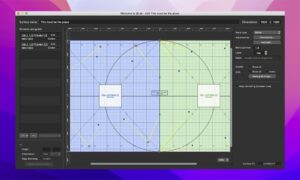
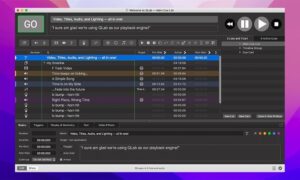
QLab 5.6 is macOS show-control software for audio QLab Pro 5.6 for Mac — Show Control Software

Pros & Cons Show details

✅ PROS

  • A single workspace unifies audio, video, lighting, and network show control, which reduces operator complexity during live performances.
  • Cue lists, groups, and fades give precise, repeatable timing that theatre and event professionals rely on night after night.
  • Deep OSC, MIDI, MSC, and AppleScript support makes QLab practical as the hub of a larger technical production stack.
  • Version 5.6 adds visible audio metering in patch and level editors, making gain staging and routing easier to monitor during setup.
  • Collaboration and QLab Remote let multiple Macs share or operate one workspace, which helps split design and playback roles in larger venues.
  • The free tier and timed demo mode let you test real show files before committing to paid Audio, Video, or Lighting licenses.

❌ CONS

  • QLab runs only on macOS, so Windows or Linux teams cannot use it as a native playback or design station.
  • Full Pro capability requires separate paid Audio, Video, and Lighting licenses, which adds significant cost for small productions.
  • Video-heavy shows with NDI, multiple outputs, or object audio still demand capable Mac hardware to avoid dropped frames or latency.
  • The cue-based model and large feature set carry a learning curve that may feel steep for users coming from simple media players.
  • QLab is not distributed on the Mac App Store; licenses are account-based and tied to vendor activation rules.
  • Version 5.6 is superseded by 5.6.1 on the vendor download page, so teams may prefer the newer build for the latest fixes.
✅ What's New in 5.6 Show details
  1. 2D fade path looping — Fade and Network cues with 2D paths can loop continuously for repeating geometry or parameter animations.
  2. Audio meters in editors — Meters appear in the Audio Output Patch Editor, Audio Map Editor, Trim tab, and main Levels control for clearer level monitoring.
  3. Path smooth and loop control — New OSC commands and AppleScript properties enable smoothing and looping on video-geometry fade paths.
  4. Light instrument import — Double-clicking a .qlablight file prompts import into the front workspace or global light library with replace-or-copy options.
  5. Network port conflict alerts — Warnings and OSC Access status help detect and retry when workspace listening ports are already in use.
  6. Expanded device libraries — Dozens of new lighting instrument definitions and network device profiles (Eos, Q-SYS, Reaper, Watchout, and others) ship in 5.6.
  7. Performance and locale fixes — Large workspaces and object audio run faster; OSC decimal parsing and light-dashboard edits behave correctly on non-US locales and collaboration remotes.

Older Versions

Version Publication date
QLab Pro v5.6 Latest Current
QLab Pro v5.5.10
QLab Pro v5.5.9
QLab Pro v5.5.8
QLab Pro v5.5.7
QLab Pro v5.5.6
QLab Pro v5.5.5
QLab Pro v5.5.4
QLab Pro v5.5.3
QLab Pro v5.5.2
QLab Pro v5.5.1
QLab Pro v5.5.0
QLab Pro v5.4.11
QLab Pro v5.4.9
QLab Pro v5.4.8
QLab Pro v5.4.7
QLab Pro v5.4.6
QLab Pro v5.4.4
QLab Pro v5.4.3
QLab Pro v5.4.2
QLab Pro v5.4.0
QLab Pro v5.3.8
QLab Pro v5.3.6
QLab Pro v5.3.5
QLab Pro v5.3.3
QLab Pro v5.3.2
QLab Pro v5.3.1
QLab Pro v5.2.4
QLab Pro v5.2.2
QLab Pro v5.2.1
QLab Pro v5.1.4
QLab Pro v5.1.2
QLab Pro v5.0.13
QLab Pro v5.0.12

Installation & Troubleshooting FAQ

8 questions

Common issues when installing macOS apps

Alternatives

Join the Conversation

Your email address will not be published. Required fields are marked *