
Easy New File 6.0 for Mac

Easy New File
Name:Easy New File 6.0 MAS [TNT].dmg.torrent (6.99MB)
Hash:c4c9610e3872f60ae07b14d22353e653dae4a8da
Review by:
Downloads 213
Rating
4.6 24 Click to rate
Checked
   Download Torrent Download Now

What Easy New File does on Mac

Easy New File is a Mac App Store utility that extends Finder with a right-click menu for creating new documents, copying file paths, and opening Terminal in the current folder.

macOS does not offer Windows-style “New File” in Finder by default. Easy New File fills that gap through a Finder Sync extension. After you enable it in System Settings under Extensions, contextual menu items appear when you control-click a folder or empty space in a supported location. You can spawn common file types such as plain text, RTF, Office documents, Keynote, shell scripts, Python, and Swift, or add your own custom templates.

Typical Mac workflow

Enable the extension once, then right-click a project folder to create a blank file with the correct extension instead of opening an app first. Copy Path puts the full POSIX path on the clipboard for shell scripts, Git commands, or documentation. New Terminal Here opens a terminal session rooted in the selected directory. External volumes can be added so the same shortcuts work on USB drives or network mounts you configure in preferences.

Version 6.0

Version 6.0 refreshes the app rather than adding major new menu actions. The preferences window uses a cleaner macOS-style layout, template version selection defaults to current document formats, and built-in templates now stamp accurate creation and modification dates on new files. Setup instructions point to modern System Settings instead of legacy System Preferences wording. The developer removed Fabric and Crashlytics dependencies, which shrinks the install and drops third-party crash analytics; the minimum macOS version is now 10.15 Catalina.

Licensing and setup

Easy New File costs $1.99 on the Mac App Store as a one-time purchase with Family Sharing. The developer reports no data collection in App Store privacy labels. If menu items do not appear after enabling the extension, relaunch Finder (Option-click the Finder icon in the Dock and choose Relaunch), which the developer notes can be required due to macOS extension caching behavior.
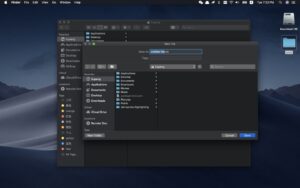
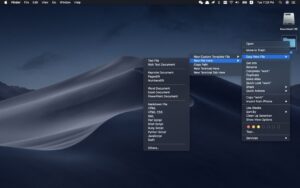
Easy New File 6.0 adds New File, Copy Path, and Open Terminal Easy New File 6.0 for Mac — Finder Right-Click Menu

Pros & Cons Show details

✅ PROS

  • Easy New File restores a practical New File workflow in Finder that macOS lacks natively, saving steps when starting text, code, or Office documents.
  • Copy Path and Open Terminal Here in the same context menu reduce friction for developers who work between Finder and the command line.
  • Custom templates and support for external disks let you standardize file types across local and removable volumes from one extension.
  • Version 6.0 removes Fabric and Crashlytics and reports no data collection, which simplifies privacy for a small utility.
  • At $1.99 with Family Sharing on the Mac App Store, it is an inexpensive one-time purchase compared with larger Finder enhancement suites.

❌ CONS

  • Version 6.0 focuses on preferences and template maintenance; it does not add major new Finder actions beyond what earlier releases already offered.
  • Finder Sync extensions must be manually enabled in System Settings, and menu items may not appear until Finder is relaunched.
  • The minimum macOS version rose to 10.15 in 6.0, so Macs stuck on macOS 10.13 or 10.14 cannot install this build.
  • Template coverage is basic compared with dedicated rivals such as New File Menu, which supports more office formats and cloud-folder quick actions out of the box.
  • macOS upgrades occasionally break third-party Finder extensions, and the developer has not published detailed accessibility support information on the App Store.
✅ What's New in 6.0 Show details
  1. [Redesigned preferences window] — Version 6.0 replaces the settings UI with a cleaner macOS-style layout that is easier to scan when managing templates and extension options.
  2. [Template version selection] — A new template version picker lets you choose document format versions, with the latest templates selected by default for new files.
  3. [Refreshed built-in templates] — Built-in templates now create files with current creation and modification timestamps instead of stale dates from older template bundles.
  4. [System Settings setup guidance] — In-app instructions were updated for enabling the Finder extension through modern macOS System Settings rather than legacy System Preferences paths.
  5. [Removed Fabric and Crashlytics] — Legacy analytics and crash-reporting dependencies were removed, improving compatibility on macOS 10.15 and later and reducing the app install size to about 2.7 MB on the App Store.

Older Versions

Version Publication date
Easy New File v6.0 Latest Current
Easy New File v5.8
Easy New File v5.7
Easy New File v5.6
Easy New File v5.5
Easy New File v5.3
Easy New File v5.2
Easy New File v5.1
Easy New File v5.0
Easy New File v4.9

Installation & Troubleshooting FAQ

8 questions

Common issues when installing macOS apps

Alternatives

Important

Mount the image and launch Open Gatekeeper Friendly.

Press Enter to bypass Gatekeeper in the Terminal window.

Drag the application to the Applications folder.

The application is ready to use.

Compatibility
macOS 10.15 and later

Architecture
ARM, x86 (64-bit)

Join the Conversation

Your email address will not be published. Required fields are marked *