
Timing on Mac
Timing is a native macOS time tracker that records which apps, documents, websites, and meetings you use in the background, so you can assign hours to projects without starting a timer for every task switch.
Who it helps
- Freelancers and consultants who bill clients and forget to start timers during deep work.
- Developers who jump between Xcode, VS Code, Terminal, browsers, and Slack in one session.
- Designers, writers, and lawyers who need accurate logs tied to files, URLs, or case tools.
How a typical day works
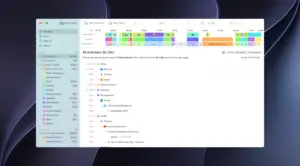
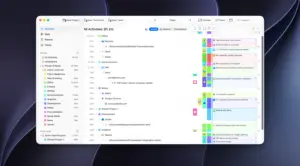
- Timing runs quietly and builds a timeline of app usage, file paths, and page titles.
- You drag activities onto projects or let rules auto-assign recurring patterns.
- Add offline time for calls and meetings, or start manual timers when you want explicit control.
- Export reports with billing status, rounding, and integrations when invoicing is due.
Standout capabilities
Unlike simple stopwatch apps, Timing captures granular context: full document paths in creative and dev tools, email subjects, Messages threads, calendar events, and optional iOS Screen Time import. Rules can match apps, URLs, window titles, and regular expressions. Integrations include Linear, ClickUp, Clio, calendar, reminders, and GrandTotal invoicing. Expert and Connect tiers add filters, scripting, Web API access, team views, and MCP-based AI workflows.
Version 2026.3.1
Build 2026.3.1 refines the project drop zone introduced in 2026.3: you can hide the sidebar drop zone from the View menu and drop activities, files, or folders onto the New Project toolbar button instead. The rule editor now grows with row count, expanded activity rows stay open after filtering, and Dia browser profile names appear in tracked window titles for custom rules. Bug fixes cover invisible inline rename text, sync signup layout, and rare rule-evaluation crashes.
Licensing
Timing sells as a subscription (Professional, Expert, or Connect) with a 30-day trial, not a one-time license. It is distributed outside the Mac App Store so sandbox limits do not block detailed activity logging. macOS 11 or later is recommended for current builds.




Timing 1.8Compatibility
macOS 10.15 and later
Architecture
ARM, x86 (64-bit)