
AltTab Pro 11.3.0 for Mac

AltTab
Name:AltTab Pro 11.3.0 [EDiSO].dmg.torrent (9.46MB)
Hash:df9fa8855e4793e2e74674a841b28e53470a5e6b
Review by:
Downloads 128
Rating
4.4 12 Click to rate
Checked
   Download Torrent Download Now

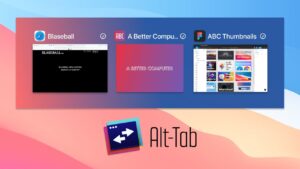
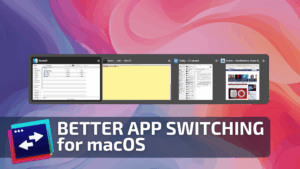
AltTab brings a Windows-style window switcher to macOS: hold a shortcut (default Option+Tab), see live thumbnails of open windows, and jump to any app or document—not only the front window per application like native ⌘Tab.

What it does on Mac

AltTab lists windows across spaces and apps with previews, optional window controls, trackpad gestures, and deep filtering (current space, visible windows, app grouping, and more). Version 11 introduced AltTab Pro ($9.99 one-time): search-by-typing, App Icons and Titles switcher styles, auto-sizing thumbnails, and up to nine independent shortcut profiles. Core window switching stays free and open source under GPL-3.0; anyone can build from GitHub without a license. The app needs Accessibility and Screen Recording permissions to enumerate and thumbnail windows.

Typical workflow

Ex-Windows users and multi-monitor Mac owners install AltTab from alt-tab.app or GitHub releases, grant permissions once, then replace or supplement ⌘Tab with Option+Tab for per-window focus. Video editors, developers, and researchers with dozens of open documents benefit most; Pro search and extra layouts help when the window list grows long. A 14-day Pro trial applies to new installs; contributors and donors receive lifetime Pro licenses per the developer’s policy.

Version 11.3.0

Release 11.3.0 shipped June 4, 2026, as a targeted compatibility update. Official notes list one feature: better support for Adobe apps (GitHub issue #5707). Users reported After Effects and Premiere Pro appearing as icon-only entries without thumbnails and breaking round-trip Alt+Tab switching; 11.3.0 restores proper window recognition for those workflows. Broader 11.1 changes (non-Latin keyboard layouts, Electron hidden-window handling) remain in the 11.x line documented on earlier release tags.
AltTab Pro 11.3.0 for Mac — Window Switcher  AltTab Pro 11.3.0 on Mac: Windows-style window switcher, Adobe app fix. Core free; Pro $9.99. Open source GPL-3.0.

Pros & Cons Show details

✅ PROS

  • AltTab solves macOS’s app-only ⌘Tab limitation by showing every window with thumbnails, which matches how many switchers work on Windows and Linux.
  • The core switcher remains free and GPL-licensed; you can download binaries or compile from source without paying for basic functionality.
  • Pro adds practical power features—typed search, alternate layouts, auto-sized grids, and multiple shortcut profiles—for users with large window sets.
  • Version 11.3.0 specifically fixes Adobe After Effects and Premiere Pro detection so Creative Cloud users get thumbnails and reliable return switching.
  • The project has years of iteration (millions of downloads, strong GitHub community) and native Swift performance without an Electron shell.

❌ CONS

  • AltTab 11.3.0 is a single-issue Adobe compatibility patch; upgraders not using After Effects or Premiere may see no visible change.
  • Pro features (search, extra styles, nine shortcuts) require a $9.99 license after the 14-day trial, while v10 and earlier were fully free binaries for all features.
  • Adobe workarounds depend on non-standard window APIs Adobe uses; future Adobe updates could break detection again until AltTab ships another fix.
  • The app requires invasive macOS permissions (Accessibility and Screen Recording), which some users and managed Mac policies block.
  • Official binaries for older major versions were removed from GitHub releases; downgrading past v11 means building from source tags yourself.
✅ What's New in 11.3.0 Show details
  1. [Adobe app support] — Version 11.3.0 adds improved handling for Adobe Creative Cloud applications that previously misbehaved in the switcher.
  2. [After Effects window detection] — After Effects windows that were rejected as non-standard AXFloatingWindow elements can appear in AltTab with proper focus behavior again.
  3. [Premiere Pro switching] — Premiere Pro users who saw icon-only entries and broken round-trip Alt+Tab cycles benefit from the same fix shipped for issue #5707.
  4. [Thumbnail previews for Adobe] — Adobe video apps that showed only an app icon without a live preview can display window thumbnails in the switcher after 11.3.0.
  5. [Updated Adobe bundle rules] — The release refreshes developer-side identification rules after Adobe bundle identifier changes that broke a legacy 2022 workaround.

Older Versions

Version Publication date
AltTab Pro v11.3.0 Latest Current
AltTab Pro v11.1.0
AltTab v10.3.0
AltTab v10.2.0
AltTab v9.0
AltTab v8.1.0
AltTab v6.51.0
AltTab v6.50.0
AltTab v6.48.0
AltTab v6.45.0
AltTab v6.43.0
AltTab v6.42.0
AltTab v6.41.1
AltTab v6.41.0
AltTab v6.40.0

Installation & Troubleshooting FAQ

8 questions

Common issues when installing macOS apps

Alternatives

1 Comment

  1. Run the downloaded image and drag the application to the Applications folder shortcut.

    Once the copy is complete, you can launch the application from Launchpad.

    Compatibility
    macOS 10.12 and later

    Architecture
    ARM, x86 (64-bit)

Join the Conversation

Your email address will not be published. Required fields are marked *