Internet Status 5.9 for Mac

Internet Status
Review by:
Downloads 429
Rating
4.6 22 Click to rate
Checked
   Download Torrent Download Now    Download Link

Internet Status 5.9 for Mac

Internet Status (listed on the Mac App Store as iON: Internet Status) is a small menu bar utility from AppYogi Software that shows whether your Mac actually has working internet—not just whether Wi‑Fi is connected.

What it does day to day

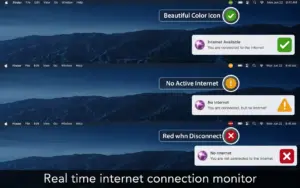
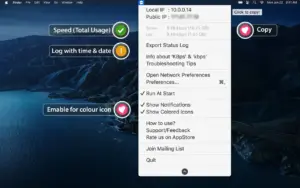
After launch, the app lives in the menu bar with a green, yellow, or red icon. Green means an active internet connection; yellow means the Mac is on a network but without usable internet; red means no connection. Click the icon to see your public and local IP, current upload and download speeds, the Wi‑Fi network name, and session data usage since the Mac started.

That is useful when video calls drop, downloads stall, or you are not sure if the problem is your router, VPN, or the Mac itself. You can copy your public IP with one click, turn on notifications when connectivity changes, pick custom alert sounds, and export a text log of connection events with timestamps for troubleshooting or sharing with support.

Who it suits

The app fits anyone who wants a lightweight always-visible network indicator without opening System Settings or running Terminal checks. Remote workers, developers on flaky home broadband, and people who hop between Wi‑Fi and tethering often use this kind of tool to catch disconnects early. It is not a full network analyzer—there are no deep packet tools or router management—but it covers the basics most Mac users need at a glance.

Setup and requirements

Internet Status runs on macOS 10.11 or later and works on Intel and Apple Silicon Macs. You can launch it at login, switch between colored and monochrome menu bar icons, and choose from several icon styles. The App Store build costs $0.99 and supports Family Sharing; AppYogi also sells a direct download with a trial from their site. Data usage counters reset after a reboot, which the developer documents in the store listing.

Version 5.9 is a recent maintenance update; the App Store notes mention bug fixes and performance improvements rather than new features. Support contact on the listing: [email protected].

More: Mac App Store
Pros & Cons Show details

✅ PROS

  • A color-coded menu bar icon shows online, limited, or offline status without opening System Settings or a browser test page.
  • Live upload and download speeds plus session data usage help you spot throttling or a stuck connection during calls and downloads.
  • Public and local IP display with one-click copy is handy for VPN checks, remote support, and router configuration.
  • Custom notifications and sounds alert you when connectivity drops or returns, which matters on unstable Wi‑Fi or when the Mac sleeps.
  • At $0.99 on the App Store with Family Sharing, it is an inexpensive dedicated monitor compared with heavier network suites.

❌ CONS

  • Version 5.9’s App Store changelog is generic, so you cannot tell exactly which bugs were fixed before upgrading.
  • Session data usage counters reset on reboot, so they do not replace long-term bandwidth accounting or ISP meter tracking.
  • The utility monitors status and speeds but does not diagnose DNS, VPN routing, or Wi‑Fi signal quality in depth.
  • AppYogi’s privacy label lists diagnostics and identifiers collection, which may matter if you prefer utilities with a “no data collected” label.
  • Accessibility support is not declared on the App Store, and the developer has not published detailed release notes beyond the store “What’s New” text.
✅ What's New in 5.9 Show details
  1. [Performance improvements] — AppYogi reports general performance work in 5.9, which may reduce menu bar overhead on older Macs.
  2. [Bug fixes] — The update addresses unspecified bugs; the store page does not list individual issues.
  3. [Version 5.9 release] — Current App Store build (about 5.9 MB) replaces 5.8 from June 2025 on the public listing.
  4. [Maintained compatibility] — Still requires macOS 10.11 or later and targets Intel and Apple Silicon Macs per the product description.
  5. [Ongoing AppYogi support channel] — Listing continues to direct feedback and bug reports to [email protected] for this release line.

Older Versions

Version Publication date
Internet Status v5.9 Latest Current
Internet Status v5.8
Internet Status v5.7
Internet Status v5.4
Internet Status v5.2
Internet Status v5.1
Internet Status v5.0
Internet Status v4.8

Installation & Troubleshooting FAQ

8 questions

Common issues when installing macOS apps

Alternatives

Join the Conversation

Your email address will not be published. Required fields are marked *