
Deckset 2.0.51 for Mac

Deckset 2
Name:Deckset 2.0.51 [TNT].dmg.torrent (114.13MB)
Review by:
Downloads 321
Rating
4.6 33 Click to rate
Checked
   Download Torrent Download Now

Deckset 2.0.51 for Mac

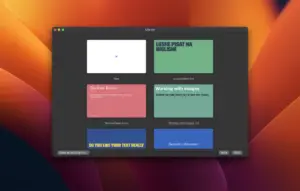
Deckset is a macOS presentation app that turns Markdown documents into styled slide decks, combining text-first authoring with design controls suited for technical and business presentations.

What Deckset does

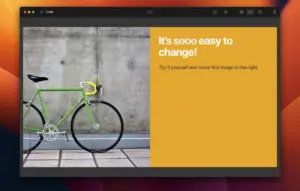
Deckset is built for users who prefer writing content in Markdown and want consistent slide design without manually arranging each object. It supports themes, code blocks, math rendering, media embeds, and presenter workflows while keeping source material in plain text.

This makes it practical for developers, educators, product teams, and consultants who iterate quickly on slide content and want version-control-friendly presentations. Instead of editing slides visually from scratch, you define structure and commands in Markdown and let Deckset handle layout behavior.

Workflow and platform context

Deckset runs on macOS (10.15 or newer) and is commonly used as a lightweight alternative to traditional slide editors for text-heavy decks, technical talks, and repeatable template-based presentation pipelines.

Version 2.0.51

Version 2.0.51 adds a white pause screen mode that can be used to show auxiliary information (for example QR codes, links, or Wi-Fi credentials) while pausing a presentation. It also strengthens the vignette filter effect and expands its value range to -1..1, plus fixes MathJax rendering for formulas that previously displayed with incorrect styling.

Licensing and requirements

Deckset is a commercial app with trial and paid licensing options published on the vendor site. The macOS app requires Catalina (10.15) or newer.
Pros & Cons Show details

✅ PROS

  • Markdown-first workflow is fast for users who already write docs in plain text.
  • 2.0.51 improves live-presentation control with a practical white pause screen.
  • MathJax styling fix is important for technical decks containing formulas.
  • Theme-driven rendering helps keep visual consistency across large slide sets.
  • Easier to version and review than binary presentation files in team workflows.

❌ CONS

  • Not ideal for users who rely on freeform drag-and-drop design on every slide.
  • Markdown command syntax has a learning curve for non-technical presenters.
  • Advanced visual customization may still require theme knowledge and iteration.
  • Compatibility with complex third-party embeds can vary between release versions.
  • Commercial licensing may be a blocker for occasional or one-off presenters.
✅ What's New in 2.0.51 Show details
  1. [White pause screen] — Added support for a white pause screen where you can display extra info such as QR links or Wi-Fi details.
  2. [Vignette filter update] — Vignette effect is stronger and now accepts values from -1 to 1 for finer control.
  3. [MathJax rendering fix] — Fixed incorrect styling for some formulas rendered with MathJax.
  4. [Patch profile] — 2.0.51 is a focused quality/UX update rather than a large feature overhaul.
  5. [Practical impact] — Improves reliability for technical presentations and adds better presenter-time utility.

Older Versions

Version Publication date
Deckset v2.0.51 Latest Current
Deckset v2.0.48
Deckset v2.0.45
Deckset v2.0.44
Deckset v2.0.43
Deckset v2.0.42
Deckset v2.0.41
Deckset v2.0.40
Deckset v2.0.39
Deckset v2.0.38
Deckset v2.0.37
Deckset v2.0.34
Deckset 2.0.33 (2697) v2.0.33.2697
Deckset v2.0.32
Deckset v2.0.31
Deckset v2.0.29
Deckset v2.0.28
Deckset v2.0.27
Deckset v2.0.25
Deckset v2.0.23
Deckset v2.0.21
Deckset v2.0.20
Deckset v2.0.19
Deckset 2.0.18 (2582) v2.0.18.2582
Deckset v2.0.17
Deckset v2.0.16
Deckset v2.0.14
Deckset v2.0.12
Deckset v2.0.11
Deckset v2.0.9

Installation & Troubleshooting FAQ

8 questions

Common issues when installing macOS apps

Alternatives

Join the Conversation

Your email address will not be published. Required fields are marked *