

BetterTouchTool 6.521 for Mac
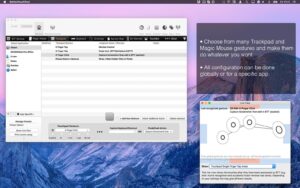
BetterTouchTool (BTT) from Andreas Hegenberg’s folivora.ai is a deep macOS automation and customization app. It maps trackpad and Magic Mouse gestures, keyboard shortcuts, key sequences, Touch Bar layouts, Stream Deck keys, Siri Remote input, and more to hundreds of actions—plus built-in tools for window snapping, clipboard history, screenshots, customizable floating menus, and an integrated Spotlight-style launcher (beta).
What BetterTouchTool does
At its core, BTT lets you define triggers (for example a three-finger swipe, a long press on a mouse button, or Control+Space) and attach one or more actions (launch apps, resize windows, paste text, run Apple Shortcuts, execute shell or JavaScript, control media, switch Spaces, show a floating widget menu, and so on). Actions can be chained and conditioned, which is why many power users treat BTT as the glue between input devices and daily Mac workflows.
Officially supported input surfaces include MacBook and Magic trackpads, Magic Mouse, normal mice (including discrete and continuous button-drag gestures), Logitech mice and keyboards with native integration, the Touch Bar, Elgato Stream Deck, Apple/Siri Remote, text triggers, and BTT Remote on iOS. Version 6 added major expansion in floating menus (drawer, Now Playing, weather, and Swift-based custom plugin widgets), edge swipe and circle gestures, improved smooth scrolling for standard mice, optional [email protected] assistant features (off by default), and stronger Logitech device support documented in the 6.286 release notes.
Built-in utilities
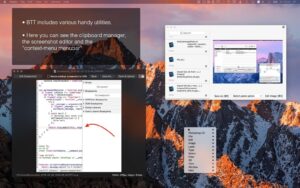
Beyond triggers, BTT bundles window snapping and moving comparable to BetterSnapTool, a clipboard manager, window switcher, screenshot capture and editor, menu bar customization, live touch visualization, and usage statistics. The vendor positions it as one app replacing several single-purpose utilities, at the cost of higher configuration complexity than a minimal snap tool.
Version 6.521
Build 6.521 (archive filename btt6.521-2026051309.zip) is listed on folivora’s official release download page with a last-modified date of 14 May 2026. There is no dedicated line-item changelog for 6.521 on the main release-notes page; the newest summarized entry there at research time was 6.304 (25 March 2026), described as a small follow-up to the prior major update. For changes between 6.304 and 6.521, the developer points users to the community development overview thread, which documents incremental builds through early 6.2xx but may lag the latest 6.5xx builds.
If your catalog ships 6.521 specifically, treat it as a recent 6.x maintenance or alpha-channel build unless you confirm it against the vendor’s current stable recommendation.
Licensing and requirements
BTT is sold directly from folivora.ai: a Standard license (about $15, two years of updates, two Macs) or a Lifetime license (about $25, ongoing updates while the product exists, two Macs—exact totals vary by region and tax). A 45-day fully functional trial is available without payment details. BTT is not on the Mac App Store; it is also available via Setapp. The developer states compatibility with recent macOS releases including Sequoia and Tahoe; some features (for example certain speech actions) require newer macOS versions as noted in official release notes. Installation requires granting Accessibility and related permissions so BTT can intercept and remap input.




It’s not running because it’s being detected as a malicious program.
Don’t forget — the first time, go to Privacy & Security in Settings and allow the app to run. Fixes won’t help with that, for some reason. Otherwise it’ll keep showing as “damaged” every time you try to launch it. 😊