

Glyphs v3.5-3526 for Mac
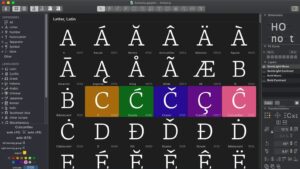
Glyphs 3 from Glyphs GmbH is a professional Mac font editor for drawing type, building variable fonts, and exporting production-ready OpenType—used by foundries and designers worldwide.
Build 3526 (21 May 2026) is the latest Glyphs 3.5 cutting-edge release, with preview, STAT, RTL, and workflow fixes on top of the 3.4 foundation.
What Glyphs does
- High-precision vector drawing for letters, symbols, and icon sets
- Variable fonts — design axes, interpolation, and instance management
- OpenType features, kerning, hinting, and multi-format export (OTF, TTF, WOFF, UFO, and more)
- Smart components, color fonts (COLR), and broad multilingual / OpenType script support
- Plugin Manager plus Python scripting for custom workflows
What’s new in build 3526
- Preview Panel shows content earlier; STAT table improvements
- Fixes for project-window dragging/tabbing, Edit View restoration, and RTL measurement lines
- Kerning preserved when replacing glyphs; ssXX “automatic” feature checkbox fix
- Support for Tulu Tigalari; imatra anchor for iMatra prescriptive code
- Larger allowed coordinates for nodes and anchors; improved error reporting
Recent 3.5 line: UFO round-tripping, VORG/COLR export, smart-component and variable-font fixes, Arabic/Hebrew feature updates, and Export Open Paths for centerline/CAD workflows (earlier 3.5 builds).
Requirements & licensing
- Version: 3.5 (build 3526)
- Platform: macOS 10.11+; Universal (Intel and Apple Silicon)
- License: paid app (~€299); 30-day trial; free updates for licensed Glyphs 3 users; also on Setapp
Official: Glyphs · Release notes (3526)




Run the downloaded image and drag the application to the Applications folder shortcut.
Once the copy is complete, you can launch the application from Launchpad.