

Dato v5.8.0 [MAS] for Mac
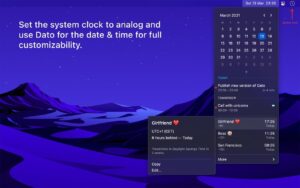
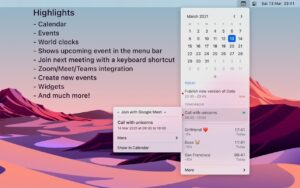
Dato by Sindre Sorhus is a menu bar calendar and world-clock hub: local time, upcoming events, multiple time zones, and meeting-friendly notifications—without opening Calendar every few minutes.
It is a one-time purchase (not a subscription) with ongoing updates; version 5.8.0 (Apr 30) targets macOS 26.
What’s new in v5.8.0
- macOS 26 required — last macOS 15–compatible build is available from the developer’s site
- Free time between events — optional setting to surface gaps in your schedule
- Compact time zones — double-click a zone in the window to collapse it to a single line
Why people use Dato
Menu bar at a glance: next events, customizable date/time format, optional seconds, week numbers, and event dots on the calendar.
World clocks: offline search across thousands of cities, custom labels, time-travel preview, optional UTC in the menu bar.
Meetings: fullscreen alerts, join buttons for 50+ video services (Zoom, Google Meet, Teams, and many others), global shortcuts to join or create events.
Calendar sync: uses calendars you already set up in macOS (iCloud, Google, Outlook, etc.).
Extras: widgets, reminders, Shortcuts support, hourly chime, floating clock, deduplicated duplicate events across calendars.
App Store details
- Version: 5.8.0
- Channel: Mac App Store (MAS)
- Price: $18.00 (one-time, region may vary)
- Requires: macOS 26.0 or later
- UI language: English (menus/settings); menu bar date/time follows system locales
Official: sindresorhus.com/dato



Mount the image and launch Open Gatekeeper Friendly.
Press Enter to bypass Gatekeeper in the Terminal window.
Drag the application to the Applications folder.
The application is ready to use.
Compatibility: macOS 15.3 and later
Architecture
ARM, x86 (64-bit)