Session Pomodoro Focus Timer 2.13.47 for Mac

Session Pomodoro Focus Timer
Name:Session 2.13.47.dmg.torrent (54.18MB)
Hash:3d4f6b14f5687416d909563a5a4c6d23c359c24d
Review by:
Downloads 197
Rating
4.8 35 Click to rate
Checked
   Download Torrent Download Now

Session

A Pomodoro-style focus timer from Translucent LLC for Mac, iPhone, iPad, and Apple Vision that structures work into timed sessions, enforces breaks, and tracks what you worked on—aimed at freelancers, students, and knowledge workers who lose focus to notifications and open tabs.

Typical Mac workflow

You state an intention, rotate the timer dial to start a focus block (often 25 or 45 minutes), and work until Session enters overflow or a scheduled break. On Mac, the app can block chosen websites in Safari, Chrome, Brave, and Edge and block distracting apps while a session runs, then restore access when you rest. Slack teams can mute automatically during focus and reopen afterward.

After each session, Session may ask what you learned and logs duration, category, and notes for daily review. One-way Apple Calendar sync creates session entries so you can see how the day progressed. Shortcuts, AppleScript, Do Not Disturb automation, widgets, Live Activities, and cross-device sync let you start on Mac and continue on iPhone or Apple Watch. The 2.13 line added Apple Reminders in the calendar view and an early To Do preview with Things 3 and Linear integrations.

Licensing and version 2.13.47

Session is free to download with Pro at about $4.99 per month or $39.99 per year via the Mac App Store; a direct Mac download is also available from stayinsession.com. Version 2.13.47, released 3 July 2026, fixes a Pro-subscription crash on iOS and iPadOS and addresses early To Do preview bugs around session titles and state. Requires macOS 10.15 or later for the Mac build.
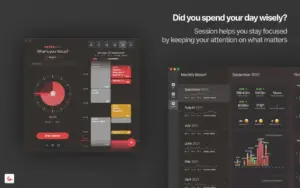

Session 2.13.47 — Pomodoro Timer for Mac

Pros & Cons Show details

✅ PROS

  • Flexible Pomodoro timing with overflow mode lets you keep partial progress instead of rigid 25-minute resets.
  • Mac-only website and app blocking during sessions targets the main distraction source for desk work.
  • Calendar sync, session notes, and daily analytics help you review whether time matched intent.
  • Cross-device sync, widgets, Live Activities, and Shortcuts fit Apple-centric multi-device workflows.
  • Apple Reminders and early To Do integrations reduce context switching when planning today’s work inside Session.

❌ CONS

  • Version 2.13.47 is a bug-fix release; headline features such as To Do remain in early preview.
  • Pro features require a subscription ($4.99/month or $39.99/year) rather than a one-time purchase.
  • Website and app blocking is Mac-focused; iOS blocking exists but the deepest blocker workflow is desktop-oriented per the vendor.
  • Session syncs data through the vendor’s servers, which may matter if you want fully local-only tracking.
  • The marketing tone is productivity-heavy; users who only need a simple timer may find the feature set more than they need.
✅ What's New in 2.13.47 Show details
  1. Pro subscription crash — Fixed an immediate crash on iOS and iPadOS when activating Pro subscription status per App Store release notes.
  2. To Do title fix — Resolved a dangling title when switching between free sessions and To Do sessions in the early preview.
  3. To Do state fix — To Do sessions no longer hijack timer state while you are running a free session.
  4. Early To Do preview — Version 2.13.47 includes ongoing fixes for the Session 3 To Do preview introduced in the 2.13 line.
  5. Build 2.13.47 — Apple lists this update with a 3 July 2026 release date on the Mac App Store universal build.

Older Versions

Version Publication date
Session Pomodoro Focus Timer v2.13.47 Latest Current
Session Pomodoro Focus Timer v2.13.20

Installation & Troubleshooting FAQ

7 questions

Common issues when installing macOS apps

Alternatives

Important

Run the downloaded image and drag the app to your program folder shortcuts.

Once the copy is complete, you can launch the app from Launchpad.

You must be logged in to any account to use the app.

Join the Conversation

Your email address will not be published. Required fields are marked *