Compressor 5.3 for Mac

Compressor
Name:Compressor 5.3.dmg.torrent (139 MB)
Hash:0688622d92f9aff5fb2b1fc8e480acb002157858
Review by:
Downloads 517
Rating
4.2 16 Click to rate
Checked
Download Now

Compressor

Apple’s professional transcoding app for Mac that extends Final Cut Pro and Motion with custom export settings, batch jobs, and network-distributed encoding when you need more control or throughput than a quick share dialog provides.

Typical Mac workflow

You send a project or clip from Final Cut Pro to Compressor, or build a batch directly by dragging source files into the app. Pick an Apple preset or tune video and audio properties in the inspector—frame size, frame rate, color space, data rates, and channel layout—then assign output locations and post-encode actions such as copying files or running a script. Destination bundles let you deliver multiple formats from one submission, and custom settings can be shared with other Final Cut editors even if they do not have Compressor installed.

For long queues, distributed encoding spreads work across other Macs on your network running Compressor as shared nodes, which can cut wall-clock time on large batches started inside Compressor itself. The interface mirrors Final Cut Pro’s layout with a sidebar of settings, a central batch list, and a viewer for inspecting sources before transcode.

Licensing and version 5.3

Compressor costs $49.99 as a one-time Mac App Store purchase; existing owners receive 5.3 as a free update. It is also included in Apple Creator Studio at about $12.99 per month or $129 per year alongside Final Cut Pro, Motion, and other creative apps. Version 5.3, released 30 June 2026, adds immersive-metadata review, 180° Apple Projected Media Profile output for Apple Vision Pro, stereoscopic anaglyph preview, 5.1 AAC in Apple Device presets, and HEVC data-rate limits on Apple silicon. It requires macOS Sequoia 15.6 or later; some features need Apple silicon per Apple.
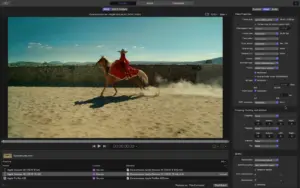

Compressor 5.3 — Video Encoding for Mac

Pros & Cons Show details

✅ PROS

  • Deep integration with Final Cut Pro and Motion suits editors who need custom presets, batch queues, and repeatable delivery templates.
  • Distributed encoding across networked Macs can speed large transcode batches when jobs are built directly in Compressor.
  • Version 5.3 strengthens immersive and stereoscopic workflows with a metadata viewer, 180° APMP export, and anaglyph preview for Vision Pro content.
  • HEVC data-rate limits on Apple silicon and 5.1 AAC in Apple Device settings give finer control over streaming and device-targeted outputs.
  • One-time purchase remains available even though Compressor is bundled in Apple Creator Studio.

❌ CONS

  • Compressor 5.3 requires macOS Sequoia 15.6 or later, which excludes Macs stuck on older macOS releases.
  • Distributed encoding cannot be used for jobs sent directly from Final Cut Pro or Motion—you must export and batch in Compressor separately.
  • The app is narrowly focused on transcoding; without a Final Cut or Motion workflow it offers little value on its own.
  • Some 5.3 features, including certain HEVC controls, require Apple silicon Macs according to Apple.
  • At $49.99 standalone—or via Creator Studio subscription—it is an add-on cost on top of Final Cut Pro for many users.
✅ What's New in 5.3 Show details
  1. Immersive metadata viewer — Review immersive, temporal, and dynamic metadata such as camera switching, mirroring, and fading before encoding.
  2. 180° APMP support — Encode 180° stereoscopic video for Apple Vision Pro using the Apple Projected Media Profile.
  3. Anaglyph preview — Preview stereoscopic sources with a new anaglyph view option before export.
  4. 1 AAC export — Apple Device export settings now include a 5.1 AAC audio option.
  5. HEVC data-rate limits — Apple silicon Macs can set data-rate limits when encoding to HEVC.
  6. Immersive transcoding fix — Sources without a WAV file can be transcoded to Apple Immersive outputs, with metadata, Photos drag-in, and preview crash fixes plus general stability improvements.

Older Versions

Version Publication date
Compressor v5.3 Latest Current
Compressor v5.2
Compressor v5.0
Compressor v4.11.0
Compressor v4.10.0
Compressor v4.9.0
Compressor v4.8.0
Compressor v4.7.0
Compressor v4.6.6
Compressor v4.6.5
Compressor v4.6.3
Compressor v4.6.2
Compressor v4.6.1
Compressor v4.6
Compressor v4.5.4
Compressor v4.5.3
Compressor v4.5.2
Compressor v4.5.1
Compressor v4.5
Compressor v4.4.8
Compressor v4.4.7
Compressor v4.4
Compressor v4.3.1
Compressor v4.3

Installation & Troubleshooting FAQ

8 questions

Common issues when installing macOS apps

Alternatives

Join the Conversation

Your email address will not be published. Required fields are marked *