
Dropzone 5 5.0.9 for Mac

Dropzone 4 Pro
Name:Dropzone 5 5.0.9 [TNT].dmg.torrent (69.38MB)
Hash:64df0a5f5300adf1c6cb25a7510d0282cdc6627a
Review by:
Downloads 216
Rating
4.2 12 Click to rate
Checked
   Download Torrent Download Now

Dropzone 5

A menu-bar Mac utility from Aptonic that turns drag-and-drop into a configurable action grid for moving files, launching apps, uploading to services, and running scripts—now rebuilt as the successor to Dropzone 4 with a Liquid Glass interface for macOS Tahoe.

Typical Mac workflow

You drag a file toward the top of the screen and the Dropzone grid appears, or you click the menu-bar icon or press F3 to open it. Drop onto an action to copy to a project folder, AirDrop to another Mac, resize an image, shorten a URL with TinyURL, upload to Imgur, or run a Shortcut. Drop Bar holds files temporarily on a floating shelf until you drag them into another app or action. Version 5 adds multiple grids so you can keep separate layouts for work, personal files, or media tasks and switch with the grid selector or ⌘1–⌘9 shortcuts.

Folder-based actions can show macOS Tahoe custom folder colors, symbols, and emoji from Finder. The redesigned Settings window manages grids, categories, column counts, and add-on actions. Developers can extend Dropzone with Ruby or Python actions or drive it from Terminal using the dz command-line tool to run actions, manage Drop Bar stacks, and switch grids in scripts.

Licensing and version 5.0.9

The base app is free with core actions; Pro unlocks SFTP, Amazon S3, custom keyboard shortcuts, and related advanced features. Aptonic sells a lifetime Pro license for about $35 (launch price $25) with a 14-day trial; the Mac App Store also offers a $4.99/month Pro subscription. Upgrading from Dropzone 4 migrates existing actions and preferences automatically, with discounted upgrade pricing on aptonic.com. Version 5.0.9 adds Italian and Japanese localizations, CLI stack naming, and developer-editor improvements. Requires macOS 13.0 or later; Aptonic reports no user data collection.
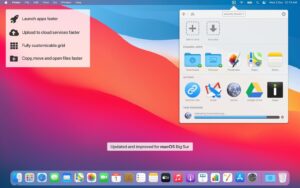

Dropzone 5.0.9 — Drag-Drop Workflow for Mac

Pros & Cons Show details

✅ PROS

  • The drag-to-grid workflow is faster than opening Finder dialogs for repetitive move, copy, upload, and share tasks.
  • Multiple grids, Drop Bar shelves, and keyboard shortcuts scale from a simple launcher to a full personal automation hub.
  • Version 5’s Tahoe Liquid Glass redesign and custom folder icons make dense action grids easier to scan.
  • The dz CLI and Ruby/Python add-on system suit power users who want scripted or custom actions.
  • A free core tier plus optional lifetime Pro license avoids forcing everyone into a subscription when buying direct from Aptonic.

❌ CONS

  • Version 5.0.9 is an incremental update; the big redesign shipped in 5.0.0, not this patch.
  • SFTP, S3, and custom action shortcuts require Pro, and the Mac App Store pushes a monthly subscription instead of only lifetime pricing.
  • Requires macOS 13 or later, so Dropzone 4 users on older systems cannot move to this line without upgrading macOS.
  • Initial grid and action setup takes time before the app feels faster than Finder alone.
  • The Mac App Store build may limit some capabilities compared with the direct download, depending on sandbox and licensing choices.
✅ What's New in 5.0.9 Show details
  1. Italian localization — Version 5.0.9 adds Italian language support across the app.
  2. Japanese localization — Japanese is now included in the 5.0.9 language set per Aptonic release notes.
  3. CLI stack naming — You can name stacks when creating them through the dz command-line tool.
  4. Preferred action editor — Developers can choose a preferred editor when working on Dropzone actions.
  5. Settings performance — The Add-on Actions Settings tab loads faster in 5.0.9.
  6. Script and CLI fixes — Editing action scripts no longer fails in some editors, and dz list-items correctly distinguishes folders from files.

Older Versions

Version Publication date
Dropzone 5 v5.0.9 Latest Current
Dropzone 4 Pro v4.80.75
Dropzone 4 Pro v4.80.73
Dropzone 4 Pro v4.80.72
Dropzone 4 Pro v4.80.70
Dropzone 4 Pro v4.80.69
Dropzone 4 Pro v4.80.68
Dropzone 4 Pro v4.80.67
Dropzone 4 Pro v4.80.66
Dropzone 4 Pro v4.80.65
Dropzone 4 Pro v4.80.64
Dropzone 4 Pro v4.80.63
Dropzone 4 Pro v4.80.62
Dropzone 4 Pro v4.80.61
Dropzone 4 Pro v4.80.60
Dropzone 4 Pro v4.80.59
Dropzone 4 Pro v4.80.58
Dropzone 4 Pro v4.80.57
Dropzone 4 Pro v4.80.56
Dropzone 4 Pro v4.80.55.2
Dropzone 4 Pro v4.80.55
Dropzone 4 Pro v4.80.54
Dropzone 4 Pro v4.80.53
Dropzone 4 Pro v4.80.52
Dropzone 4 Pro v4.80.51
Dropzone 4 Pro v4.80.50
Dropzone 4 Pro v4.80.49
Dropzone 4 Pro v4.80.48
Dropzone 4 Pro v4.80.47
Dropzone 4 Pro v4.80.46
Dropzone 4 Pro v4.80.45
Dropzone 4 Pro v4.80.44
Dropzone 4 Pro v4.80.42
Dropzone 4 Pro v4.80.40
Dropzone 4 Pro v4.80.39
Dropzone 4 Pro v4.80.37
Dropzone 4 Pro v4.80.26
Dropzone 4 Pro v4.80.25
Dropzone 4 Pro v4.80.24
Dropzone 4 Pro v4.80.23
Dropzone 4 Pro v4.80.22
Dropzone 4 Pro v4.80.21
Dropzone 4 Pro v4.80.20
Dropzone 4 Pro v4.80.19
Dropzone 4 Pro v4.80.18
Dropzone 4 Pro v4.80.17
Dropzone 4 Pro v4.80.16
Dropzone 4 Pro v4.80.15
Dropzone 4 Pro v4.80.14
Dropzone 4 Pro v4.80.13
Dropzone 4 Pro v4.80.12
Dropzone 4 Pro v4.80.8
Dropzone 4 Pro v4.80.7
Dropzone 4 Pro v4.80.5
Dropzone 4 Pro v4.80.2
Dropzone 4 Pro v4.80.1
Dropzone 4 Pro v4.80.0
Dropzone 4 Pro v4.7.9
Dropzone 4 Pro v4.7.3
Dropzone 4 Pro v4.7.2
Dropzone 4 Pro v4.7.1
Dropzone 4 Pro v4.6.9
Dropzone 4 Pro v4.6.1
Dropzone 4 Pro v4.5.7

Installation & Troubleshooting FAQ

8 questions

Common issues when installing macOS apps

Alternatives

Join the Conversation

Your email address will not be published. Required fields are marked *