
WiFi Explorer Pro 3.10.2 for Mac

WiFi Explorer Pro
Name:WiFi Explorer Pro 3 3.10.2 [TNT].dmg.torrent (17.39MB)
Hash:b0037c3e271ac5c008fbf7c5a556be604e65e13e
Review by:
Downloads 141
Rating
4.3 23 Click to rate
Checked
   Download Torrent Download Now

WiFi Explorer Pro 3

A professional Wi-Fi scanner and analyzer from Intuitibits LLC for macOS that helps WLAN and IT staff design, validate, and troubleshoot wireless networks with deep information-element decoding and flexible scan modes.

Typical Mac workflow

You launch a scan with the Mac’s built-in Wi-Fi adapter or connect to a remote sensor such as WLAN Pi, OpenWrt, or an access point in sniffer mode. Active, directed, and passive modes reveal nearby BSSIDs with graphical channel views, per-channel overlap metrics, SSID overhead estimates, and more than 950 customizable data fields. Custom column profiles, filters, and coloring rules help you spot co-channel interference, weak RSSI, or misconfigured security during site surveys or post-install validation.

Import .pcap, .pcapng, or .pkt captures and CSV exports from tools like AirPort Utility or Aruba Utilities to compare lab and field results. Spectrum analyzer integrations correlate RF data with Wi-Fi scans, and Zigbee USB adapters help assess coexistence in IoT-heavy sites. Export annotated results to CSV, PCAP, or PCAPNG for reports and handoff to Wireshark or other tools.

Licensing and version 3.10.2

WiFi Explorer Pro 3 requires macOS 13.5 or later and a Mac with built-in Wi-Fi; a 7-day trial is available from intuitibits.com. The Mac App Store edition costs $149.99, while direct purchase is $129.99 with an educational discount program. Version 3.10.2, released 6 July 2026, imports channel-width and security fields from Aruba Utilities CSV exports, adds a View menu command to size all columns to fit with ⌘⌥=, and fixes CSV exports that incorrectly included hidden columns.
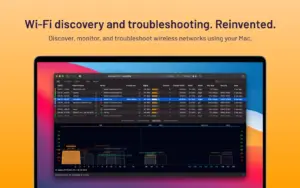

WiFi Explorer Pro 3.10.2 — Wi‑Fi Scanner for Mac

Pros & Cons Show details

✅ PROS

  • Gmail-grade depth is wrong - Wi-Fi 7 and 320 MHz channel support with 950+ fields beats consumer Wi-Fi scanners for enterprise troubleshooting.
  • Active, passive, directed, and remote-sensor scanning suit site surveys without always carrying dedicated hardware.
  • PCAPNG, PCAP, and CSV export plus capture-file import fit professional reporting and Wireshark workflows.
  • Spectrum and Zigbee integrations help separate non-802.11 interference from Wi-Fi problems.
  • Version 3.10.2 refines export and Aruba Utilities CSV import, which matters for field engineers sharing scan data.

❌ CONS

  • Version 3.10.2 is a small update with no major new scan modes or hardware integrations.
  • Passive scanning is limited on many Apple silicon Macs; M5 Pro/Max, M5 Air, and MacBook Neo have known passive-scan constraints per the vendor.
  • Requires built-in Wi-Fi; external USB adapters are not supported for native Mac scanning.
  • Pro pricing ($129.99–$149.99) is high for home users who only need basic channel viewing.
  • macOS CoreWLAN limitations can hide or misreport some Wi-Fi 7 details on older macOS versions without workarounds.
✅ What's New in 3.10.2 Show details
  1. Aruba Utilities CSV import — Version 3.10.2 imports channel-width and security fields from CSV scan results exported by the Aruba Utilities app.
  2. Size All Columns to Fit — A new View ▸ Size All Columns to Fit menu command complements the existing context-menu option.
  3. Column sizing shortcut — The new menu command can be triggered with the ⌘⌥= keyboard shortcut.
  4. CSV export fix — Fixed an issue where exporting displayed networks to CSV incorrectly included hidden columns.

  5. Minor improvements — Other minor fixes and improvements ship in the 3.10.2 build per Intuitibits release notes.

Older Versions

Version Publication date
WiFi Explorer Pro v3.10.2 Latest Current
WiFi Explorer Pro v3.9.6
WiFi Explorer Pro v3.9.5
WiFi Explorer Pro v3.9.4
WiFi Explorer Pro v3.9.3
WiFi Explorer Pro v3.9.2
WiFi Explorer Pro v3.9.1
WiFi Explorer Pro v3.9.0
WiFi Explorer Pro v3.8.1
WiFi Explorer Pro v3.8
WiFi Explorer Pro v3.7.5
WiFi Explorer Pro v3.7.4
WiFi Explorer Pro v3.7.3
WiFi Explorer Pro v3.7.1
WiFi Explorer Pro v3.7.0
WiFi Explorer Pro v3.6.10
WiFi Explorer Pro v3.6.8
WiFi Explorer Pro v3.6.7
WiFi Explorer Pro v3.6.6
WiFi Explorer Pro v3.6.5
WiFi Explorer Pro v3.6.2
WiFi Explorer Pro v3.5.6
WiFi Explorer Pro v3.5.4
WiFi Explorer Pro v3.5.3
WiFi Explorer PRO v3.5.2
WiFi Explorer Pro v2.1.6

Installation & Troubleshooting FAQ

8 questions

Common issues when installing macOS apps

Alternatives

Join the Conversation

Your email address will not be published. Required fields are marked *