
Acorn 8.6.1 for Mac

Acorn 8.5.1
Name:Acorn 8.6.1 [EDiSO].dmg.torrent (29.43MB)
Hash:483d3af91343bb64cfea490308ea573c138a832a
Review by:
Downloads 214
Rating
4.3 20 Click to rate
Checked
   Download Torrent Download Now

Acorn

A native macOS image editor from Flying Meat Inc. that combines layer-based photo retouching, vector shapes, non-destructive filters, and broad export formats in a single-window app without a subscription.

Typical Mac workflow

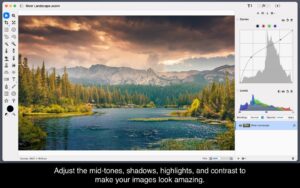
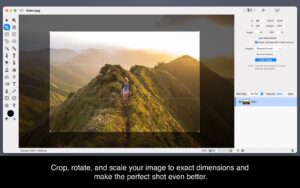
You open photos or start a blank canvas, organize work in layers with masks and blend modes, then retouch with clone, dodge, burn, smudge, and customizable brushes. Non-destructive curves, levels, and stacked filters let you revisit adjustments later; vector tools handle arrows, Bézier paths, and text on a path for labels and simple layouts. The Command Bar (⌘⇧O) jumps to menu commands or help topics, while Apple Shortcuts, AppleScript, JavaScript, and the acorncli shell tool automate batch crops, exports, and resizing.

Version 8 added AI subject selection, Live Text extraction, data-driven graphics via CSV merge, LUT color grading, JPEG-XL import and export, super-resolution resizing, and layered screenshots. Acorn reads PSD, SVG, RAW, HEIC, WebP, and many other formats, then exports through a live-preview panel to PNG, JPEG, GIF, PDF, and more. ML models for background removal and super resolution download on first use, which keeps the base app smaller for users who skip those features.

Licensing and version 8.6.1

Acorn 8 requires macOS 14 Sonoma or later and runs as a universal binary on Apple Silicon and Intel Macs. You buy it once from flyingmeat.com or the Mac App Store (about $29.99 on the App Store) with a 14-day trial on the direct build; there is no subscription. Version 8.6.1, released 3 July 2026, fixes brush-engine problems with canvas selections, older Intel GPUs, and legacy CPU Memory backing settings, corrects overly bright PQ-profile images on the Studio Display XDR, and removes obsolete Renderer and Backing options from the Fussy Stuff settings tab.
Acorn 8.6.1 patches the 8.6 brush engine and Studio Display Acorn 8.6.1 — Image Editor for Mac

Pros & Cons Show details

✅ PROS

  • One-time purchase with a usable free core beats subscription photo editors for hobbyists and indie designers.
  • Layer masks, non-destructive filters, curves, and broad format support cover most everyday retouching without opening Photoshop.
  • JavaScript, Shortcuts, AppleScript, and acorncli automation suit batch exports and scripted editing pipelines.
  • Optional on-demand ML model downloads keep the installer lean if you do not need AI selection or super resolution.
  • Version 8.6 added a faster brush engine with velocity thinning and linear color blending for more natural painting strokes.

❌ CONS

  • Version 8.6.1 is a patch release that only documents brush-engine and color-profile fixes, not new features.
  • Requires macOS 14 or later, so it does not run on older Ventura or Monterey Macs without falling back to Acorn 7.
  • Complex PSD workflows and industry-standard CMYK prepress still favor Adobe Photoshop over Acorn.
  • AI-powered tools need a separate model download and may not suit users who want zero machine-learning components.
  • Direct and Mac App Store builds differ slightly in licensing and update behavior, which can confuse buyers.
✅ What's New in 8.6.1 Show details
  1. Brush engine and selections — Fixed the new brush engine not working correctly with canvas selections in 8.6.1.
  2. Intel GPU brush fix — Resolved brush-engine failures on some older Intel GPUs introduced in version 8.6.
  3. CPU Memory backing — Fixed brushing when the legacy Backing preference was set to CPU Memory; that option is now removed.
  4. Studio Display XDR color — PQ-based color profile images no longer open excessively bright on the Studio Display XDR; they convert to Display P3.
  5. Settings cleanup — Removed Renderer and Backing options from the Fussy Stuff tab because they are obsolete on current hardware.
  6. Prior 8.6 brush engine — Version 8.6 introduced velocity thinning and linear-interpolation brush blending; 8.6.1 stabilizes that engine without adding features.

Older Versions

Version Publication date
Acorn v8.6.1 Latest Current
Acorn v8.5.1
Acorn v8.5.0
Acorn v8.4.1
Acorn v8.3.2
Acorn v8.3.1
Acorn v8.3
Acorn v8.2.2
Acorn v8.2.0
Acorn v8.1.0
Acorn v7.4.6
Acorn v7.4.5
Acorn v7.4.4
Acorn v7.4.3
Acorn v7.4.1
Acorn v7.3.2
Acorn v7.3.1
Acorn v7.3
Acorn v7.2
Acorn v7.1.3
Acorn v7.1.1
Acorn v7.1
Acorn v7.0.3
Acorn v7.0.2
Acorn v7.0.1
Acorn v7.0
Acorn v6.6.4
Acorn 6.6.3 (13830) v6.6.3.13830
Acorn v6.6.3
Acorn v6.6.2
Acorn v6.6.1
Acorn v5.6.1
Acorn v5.6

Installation & Troubleshooting FAQ

7 questions

Common issues when installing macOS apps

Alternatives

Join the Conversation

Your email address will not be published. Required fields are marked *