
iA Writer 8.0.2 for Mac

iA Writer mac
Name:iA Writer 8.0.2 MAS [TNT].dmg.torrent (26.33MB)
Hash:2ca09d615878fb22f7e665122e1e3045f214929b
Review by:
Downloads 152
Rating
4.3 10 Click to rate
Checked
   Download Torrent Download Now

iA Writer

A minimalist Markdown writing app for macOS from Information Architects that strips away toolbars and formatting chrome so you can draft in plain text and preview or export when ready.

How it fits a Mac writing workflow

iA Writer opens to a calm editing surface with optional Focus Mode that highlights the current sentence or paragraph while fading the rest. You write in Markdown, use Syntax Highlight to see sentence structure, and run Style Check on device to flag fillers and weak patterns without sending text to the cloud. Preview shows how the document will look with your chosen template; export paths include PDF, Word, HTML, and copy-as-HTML for blogs or CMS handoff.

The Library connects to local folders and cloud locations so you can search, sort, and switch drafts quickly. Authorship coloring distinguishes text you typed from pasted or AI-assisted passages, which helps when revising collaborative or generated drafts. Integrations with tools such as Marked remain common for writers who want an external live preview while editing in iA Writer.

Licensing and version 8.0.2

iA Writer for Mac is a one-time Mac App Store purchase (about $50 in the U.S.) with a separate trial available from ia.net for direct downloads. The Mac build requires macOS 10.15 or later. Version 8.0.2 (June 2026) is a small bug-fix update on the iA Writer 8 line, which added Liquid Glass styling on macOS 26+, unified Quick Search with document outline, a Command Palette (⇧⌘P), compact library browsing, and clearer Authorship menus.
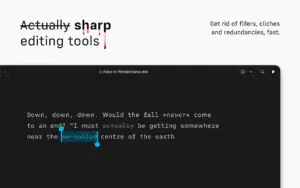
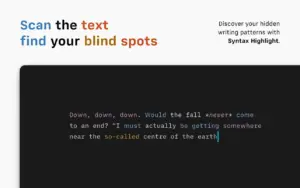
iA Writer 8.0.2 is a distraction-free Markdown editor for Mac iA Writer 8.0.2 — Focused Writing App for Mac

Pros & Cons Show details

✅ PROS

  • Focus Mode and a minimal interface reduce on-screen clutter compared with full word processors when drafting long-form text.
  • Markdown-first workflow keeps files portable and pairs well with Git, static sites, and preview apps such as Marked.
  • Style Check and Syntax Highlight run locally to sharpen prose without requiring a cloud grammar subscription.
  • Authorship coloring helps track your edits against pasted or AI-generated passages during revision and fact-checking.
  • iA Writer 8 unifies outline navigation, library search, and in-document find in Quick Search (⇧⌘O) for faster movement in long drafts.

❌ CONS

  • One-time Mac App Store price around $50 per platform, with iPhone and iPad sold separately if you want the full ecosystem.
  • Version 8.0.2 lists only unspecified “small bugs” fixed, so there is no public per-issue changelog for troubleshooting.
  • Liquid Glass visuals target macOS 26 and later; older Macs on earlier macOS versions get the app without the newest interface polish.
  • Markdown-centric design offers fewer layout controls than Word or Pages for complex print-ready documents.
  • No built-in cloud sync service—file organization depends on iCloud Drive, Dropbox, or folders you manage yourself.
✅ What's New in 8.0.2 Show details
  1. Minor bug fixes — Apple’s What’s New text states this build fixes a few small bugs without naming specific issues.
  2. Liquid Glass interface — iA Writer 8 refreshes the Mac UI for macOS 26 and later, with an app icon that follows system appearance settings.
  3. Unified Quick Search — Document Outline, headings, filenames, and text search results appear together; use ⇧⌘O to jump with arrow keys and Return.
  4. Command Palette — Press ⇧⌘P on Mac for searchable access to formatting actions, export options, and Authorship tools.
  5. Compact Library — Hide dates and excerpts for denser browsing; favorite files display a star for quicker spotting.
  6. Authorship menu colors — Interface menus show author colors so you can see who contributed to a shared or multi-source document.

Older Versions

Version Publication date
iA Writer v8.0.2 Latest Current
iA Writer v8.0
iA Writer v7.3.4
iA Writer v7.3.3
iA Writer v7.3.2
iA Writer v7.2.18
iA Writer v7.2.17
iA Writer v7.2.16
iA Writer v7.2.15
iA Writer v7.2.14
iA Writer v7.2.11
iA Writer v7.2.8
iA Writer v7.2.7
iA Writer v7.2.6
iA Writer v7.2.5
iA Writer v7.2.4
iA Writer v7.2.3
iA Writer v7.2.2
iA Writer v7.2.1
iA Writer v7.2
iA Writer v7.1.4
iA Writer v7.1.3
iA Writer v7.1.2
iA Writer v7.1.1
iA Writer v7.0.6
iA Writer v7.0.4
iA Writer v7.0.2
iA Writer v7.0.1
iA Writer v7.0.0
iA Writer v6.0.11
iA Writer v6.0.10
iA Writer v6.0.7
iA Writer v6.0.6
iA Writer v6.0.4
iA Writer v6.0.2
iA Writer v6.0.1
iA Writer v6.0.0
iA Writer v5.6.16
iA Writer v5.6.15
iA Writer v5.6.14
iA Writer v5.6.13
iA Writer v5.6.11
iA Writer v5.6.10
iA Writer v5.6.9
iA Writer v5.6.8
iA Writer v5.6.7
iA Writer v5.6.6
iA Writer v5.6.5
iA Writer v5.6.4
iA Writer v5.6.3
iA Writer v5.6.2
iA Writer v5.6.1
iA Writer v5.6
iA Writer v5.5.4
iA Writer v5.5.3
iA Writer v5.5.2
iA Writer v5.5
iA Writer v5.4.3
iA Writer v5.4.1

Installation & Troubleshooting FAQ

8 questions

Common issues when installing macOS apps

Alternatives

Join the Conversation

Your email address will not be published. Required fields are marked *