
ForkLift 4.7.1 for Mac

ForkLift
Name:ForkLift 4.7.1 [TNT].dmg.torrent (13.27MB)
Hash:ca546c40b5c8af387ccbbe382e08e73628c72e1b
Review by:
Downloads 110
Rating
4.8 34 Click to rate
Checked
   Download Torrent Download Now

ForkLift 4

A dual-pane file manager and transfer client for macOS from BinaryNights that extends Finder with remote connections, folder sync, batch rename, previews, and scripting tools in one window.

Typical Mac workflow

ForkLift opens two synchronized panes so you can drag files between local disks, network shares, and cloud backends without juggling separate apps. Supported protocols include SFTP, FTP, WebDAV, Amazon S3, Backblaze B2, Google Drive, Dropbox, OneDrive, SMB, AFP, and NFS. Sync favorites compare source and target folders, highlight new or changed items, and apply one- or two-way rules; Activity and Log views show transfer progress and outcomes in real time.

Beyond copying, ForkLift adds Quick Open for favorites and commands, remote editing with upload-on-save, archive browsing, Git status in lists, tabbed workspaces, tag management, checksum tools, and custom zsh-based Tools you can pin to the toolbar. Preview pane supports audio, video, images, PDFs, and in-place text edits on both local and remote paths.

Licensing and version 4.7.1

ForkLift 4 uses a lifetime license with a fixed free-update window (one or two years per purchase tier) rather than a monthly subscription; after updates expire you keep the last licensed build. The app requires macOS 14.6 or later per the vendor site. Version 4.7.1 (June 2026) adds metadata-driven Multi-Rename for photos and audio, $PATH support in custom tools, SMB name alignment with Finder, QuickLook Video previews, and numerous Go to Folder and sync stability fixes.
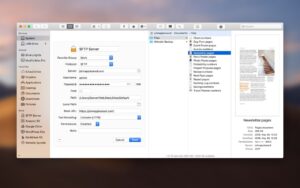

ForkLift 4.7.1 — Dual-Pane File Manager for Mac

Pros & Cons Show details

✅ PROS

  • Dual-pane layout with tabs and sync browsing speeds up everyday copy, compare, and cleanup tasks versus single-window Finder.
  • Broad remote protocol support lets one app handle SFTP servers, SMB shares, and major cloud storage from the same interface.
  • Built-in folder sync with favorites and exclusion rules targets backup and deployment workflows without a separate sync utility.
  • Multi-Rename with saved presets—and metadata fields in 4.7.1—helps organize large photo, audio, and document libraries in bulk.
  • Custom Tools, Git indicators, terminal integration, and keyboard shortcuts suit power users who live in the file system.

❌ CONS

  • Lifetime license only covers updates for one or two years; newer builds after that period require purchasing a fresh license key.
  • Requires macOS 14.6 or later, which excludes Macs that cannot upgrade past older Sonoma or Ventura releases.
  • Sold directly from BinaryNights rather than the Mac App Store, which may matter for managed or App Store–only environments.
  • Some media previews depend on the third-party QuickLook Video app for formats Finder already handles out of the box.
  • Feature depth (sync rules, tools, remote editing) creates a learning curve compared with lightweight dual-pane alternatives.
✅ What's New in 4.7.1 Show details
  1. Metadata batch rename — Multi-Rename can insert EXIF, ID3, and document fields such as capture date, camera model, artist, album, and title into filenames.
  2. Shell $PATH in Tools — Custom tools created in Settings can inherit the shell $PATH so Homebrew and other CLI utilities resolve without hardcoded paths.
  3. SMB share labels — Network share names in ForkLift now display the same way as in Finder for consistent SMB browsing.
  4. QuickLook Video previews — ForkLift can preview formats such as MKV, WebM, WMV, and FLV when the QuickLook Video helper app is installed.
  5. Go to Folder fixes — Resolves dropdown selection bugs, duplicate history entries, extra slash insertion, and crashes on S3 paths starting with ~.
  6. Sync stability — Fixes a crash when using file-size exclusion filters in the Sync window and column-view drag issues on macOS 27 Golden Gate betas.
  7. Info and UI polish — Adds metadata to the Info window, improves Multi-Rename undo logging, and adjusts preview-pane divider contrast in dark themes.

Older Versions

Version Publication date
ForkLift v4.7.1 Latest Current
ForkLift v4.6.4
ForkLift v4.6.0
ForkLift v4.5.1
ForkLift v4.5.0
ForkLift v4.4.5
ForkLift v4.4.4
ForkLift v4.4.3
ForkLift v4.4.2
ForkLift v4.4.1
ForkLift v4.4.0
ForkLift v4.3.5
ForkLift v4.3.4
ForkLift v4.3.3
ForkLift v4.3.2
ForkLift v4.3.1
ForkLift v4.3.0
ForkLift v4.2.9
ForkLift v4.2.5
ForkLift v4.2.4
ForkLift v4.2.3
ForkLift v4.2.1
ForkLift v4.1.9
ForkLift v4.1.8
ForkLift v4.1.7
ForkLift v4.1.6
ForkLift v4.1.5
ForkLift v4.1.4
ForkLift v4.1.3
ForkLift v4.1.2
ForkLift v4.1.1
ForkLift v4.1.0
ForkLift v4.0.7
ForkLift v4.0.6
ForkLift v4.0.5
ForkLift v4.0.4
ForkLift v4.0.3
ForkLift v3.5.8
ForkLift v3.5.6
ForkLift v3.5.5
ForkLift v3.5.3
ForkLift v3.5.2
ForkLift v3.5.1
ForkLift v3.4.4
ForkLift v3.4.3
ForkLift v3.4.1
ForkLift v3.4
ForkLift v3.3.4

Installation & Troubleshooting FAQ

8 questions

Common issues when installing macOS apps

Alternatives

Important

Mount the image and launch Open Gatekeeper Friendly.

Press Enter to bypass Gatekeeper in the Terminal window.

Drag the application to the Applications folder.

WARNING! SIP must be disabled. Learn more >

Compatibility
macOS 12 and later

Architecture
x86 (64-bit)

Join the Conversation

Your email address will not be published. Required fields are marked *