
Multi-List Timer 11.5 for Mac

Multi-List Timer
Name:Multi Timer 11.5 MAS [TNT].dmg.torrent (5.87MB)
Hash:0e5fec9fdb0b3bfd4a0b11dc28373a2b1e65696f
Review by:
Downloads 175
Rating
4.8 20 Click to rate
Checked
   Download Torrent Download Now

Multi-List Timer

A lightweight macOS timer app that groups several countdowns into reusable lists so you can run study intervals, workout circuits, or kitchen steps without juggling separate single-timer utilities.

Typical Mac workflow

Create one or more lists— for example “Pomodoro,” “HIIT,” or “Dinner prep”—and add timers with names, durations, and color labels inside each list. Start individual steps or launch a whole sequence from one tap, then pause, skip, or reset as the routine progresses. Notifications and sounds alert you when a segment ends, which matters when Finder or another app is in the foreground. Lists persist locally, so you can reopen the same structure daily without rebuilding timers from scratch.

Lists versus single timers

Unlike a basic clock app that tracks one countdown at a time, Multi-List Timer keeps parallel lists for different contexts: work focus blocks, gym intervals, and short breaks can live in separate menus instead of one crowded screen. Drag-and-drop reordering and batch controls help when a routine changes mid-week. The interface stays small—about 2 MB on current Mac builds—reflecting the narrow scope rather than a full project-management suite.

Privacy, pricing, and platforms

The developer positions the app as offline-first with no ads, subscriptions, or account sign-up, and App Store privacy labels report no data collection. A single purchase includes the Mac, iPad, and iPhone builds with Family Sharing; pricing varies slightly by storefront (about $0.99 in the US listing). macOS 11.0 or later is required on Mac, with visionOS also listed for the universal package. On the store the title appears as “Multi Timer: Offline & Private,” though Mac release numbering uses the 11.x line the catalog references.

Version 11.5

Release 11.5 is a maintenance update. Official App Store notes state that all localizations were refreshed across the app’s 20 supported languages—English, Chinese, Japanese, Korean, Russian, European languages, and others—without listing new timer features or UI modules. If you upgrade from 11.4 or earlier, expect translation and string consistency fixes rather than workflow changes; the core multi-list timer behavior remains the same.
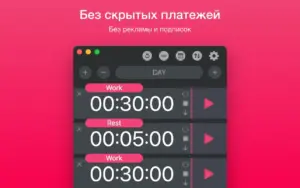
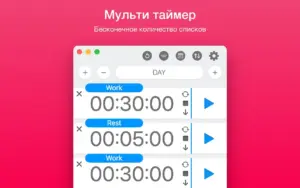
Multi-List Timer 11.5 on Mac runs several countdown lists for study Multi-List Timer 11.5 for Mac — Multi Timer Lists

Pros & Cons Show details

✅ PROS

  • Multiple independent timer lists let you keep separate routines for work, exercise, and cooking without mixing durations in one screen.
  • One App Store purchase covers Mac, iPad, and iPhone with Family Sharing, which suits households sharing workout or study templates.
  • Offline operation with no account, ads, or reported data collection fits users who want timers without cloud sync or analytics.
  • A 2 MB install and simple UI keep the app lightweight compared with subscription pomodoro suites that bundle unrelated features.
  • Twenty localizations, refreshed in version 11.5, support non-English Mac users who prefer native menu and alert text.

❌ CONS

  • Version 11.5 changelog covers localization only, so users expecting new timer modes or automation will not find feature additions in this build.
  • User reviews note limitations such as non-editable chain names, sounds only at timer end, and no duplicate action for lists—areas the developer has not addressed in public 11.5 notes.
  • macOS and iOS builds use different version numbers (11.x on Mac versus 2.x on iPhone in store metadata), which can confuse update tracking across devices.
  • The app focuses on countdown lists rather than calendar integration, task notes, or cross-device sync, so it may not replace full productivity timers like Session or TickTick.
  • Sparse public release notes beyond “thank you for using our app” make it hard to audit what changed between 11.3, 11.4, and 11.5 without installing each build.
✅ What's New in 11.5 Show details
  1. Updated localizations — version 11.5 refreshes all language packs (20 locales listed on the App Store) for consistent menus and alerts on Mac, iPad, and iPhone.
  2. Multi-list organization — the app lets you maintain separate timer lists for study, work, and workouts; this is existing core behavior, not a 11.5 addition.
  3. Sequential countdowns — timers within a list can run as chained steps for interval training or pomodoro-style blocks; documented product capability unchanged in 11.5.
  4. Offline privacy model — no sign-in, ads, or subscriptions required; timers run locally without network access per the developer description.
  5. Universal purchase — one buy includes macOS, iOS, and iPadOS builds with Family Sharing, as stated on the App Store product page.
  6. Prior 11.0 maintenance — Mac release history for 11.0 noted minor UI and localization updates in that line before later 11.x patches leading to 11.5.

Older Versions

Version Publication date
Multi-List Timer v11.5 Latest Current
Multi-List Timer v11.2
Multi-List Timer v11.1
Multi-List Timer v11.0
Multi-List Timer v10.9

Installation & Troubleshooting FAQ

8 questions

Common issues when installing macOS apps

Alternatives

Join the Conversation

Your email address will not be published. Required fields are marked *