
Easy New File 6.2 for Mac

Easy New File
Name:Easy New File 6.2 MAS [TNT].dmg.torrent (6.99MB)
Hash:aac5277a3f09c87d24c6e3dad896868ebd39c4b1
Review by:
Downloads 256
Rating
4.4 8 Click to rate
Checked
   Download Torrent Download Now

Easy New File

A lightweight Finder Sync extension for macOS that adds a right-click menu and optional toolbar control to create blank files, copy paths, and open Terminal in the current folder—filling a gap Apple never built into Finder itself.

Typical Mac workflow

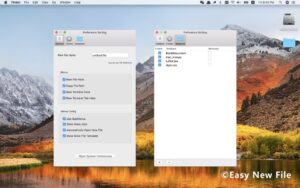
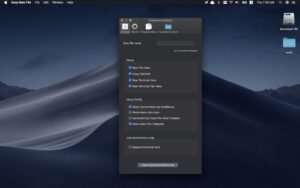
After installing from the Mac App Store, enable the extension under System Settings → General → Login Items & Extensions → Finder Extensions, then relaunch Finder if menu items do not appear—a step the developer notes is sometimes required because of macOS extension caching. Control-click empty space or a folder in Finder, pick a file type such as plain text, Markdown, RTF, Word, Excel, Keynote, shell script, Python, or Swift, and a new file appears in place with the name ready to edit. Custom templates let you seed recurring structures—report headers, YAML front matter, or boilerplate code—without copying an old file and clearing it manually. Copy Path puts the full POSIX path on the clipboard for scripts or documentation; New Terminal Here opens a shell rooted in the selected directory.

Templates and external volumes

Built-in and user-defined templates live in preferences. Version 6.0 refreshed the settings UI, added template version selection defaulting to current document formats, and updated built-in templates so new files carry accurate creation and modification timestamps instead of stale dates from older template bundles. You can also allow supported locations on external disks or network volumes you configure, which helps when project files live on USB drives rather than the internal SSD.

Licensing and privacy

Easy New File costs $1.99 as a one-time Mac App Store purchase with Family Sharing. The developer’s privacy label states no data collection. The app requires macOS 10.15 Catalina or later according to current store metadata; the install size dropped sharply in recent 6.x builds after legacy Fabric and Crashlytics analytics dependencies were removed in version 6.0.

Version 6.2

Release 6.2 is a focused maintenance update. App Store release notes report that the save panel now receives keyboard focus automatically when you create a file from the Finder context menu, so you can type the filename immediately instead of clicking the field first. General stability and compatibility improvements for recent macOS releases round out the changelog without new menu actions or file types.
Easy New File 6.2 adds Windows-style Easy New File 6.2 for Mac — Finder New File Menu

Pros & Cons Show details

✅ PROS

  • Right-click creation of dozens of common formats removes the extra step of opening an app and using Save As just to start a blank document on Mac.
  • Custom templates turn repeated file setups into one menu choice, which helps writers, developers, and office users who reuse the same structure.
  • Copy Path and New Terminal Here integrate basic developer workflows directly into Finder without separate utilities.
  • One-time $1.99 pricing with Family Sharing is inexpensive compared with subscription Finder enhancers that offer similar new-file menus.
  • The developer reports no data collection, and version 6.0 removed third-party crash analytics libraries from the bundle.

❌ CONS

  • Finder Sync extensions depend on macOS loading the plugin correctly; missing menu items after updates often require disabling the extension or relaunching Finder manually.
  • macOS still lacks a native “New File” command, so this functionality disappears entirely if the extension is disabled or incompatible with a future macOS release until the developer ships an update.
  • The Mac App Store listing’s “What’s New” section on some regional storefronts may lag, so patch history is easier to read on alternate App Store locales than on the US page.
  • Support documentation on the developer’s GitHub page is minimal and dated, with little detail beyond basic enable steps and a contact email.
  • Unlike open-source alternatives such as NewFile, this is a closed-source paid wrapper around a long-running commercial extension with limited public changelog granularity between minor releases.
✅ What's New in 6.2 Show details
  1. Save panel focus — version 6.2 fixes cases where the filename field did not auto-focus after creating a file from the Finder context menu, so you can type the name immediately.
  2. Recent macOS stability — 6.2 includes general stability and compatibility improvements on current macOS versions per App Store release notes.
  3. Preferences redesign — release 6.0 introduced a cleaner macOS-style preferences window with updated Finder extension setup guidance for System Settings.
  4. Template version selection — 6.0 adds template version picking with current document formats as the default for newly created Office and iWork files.
  5. Accurate template timestamps — 6.0 refreshed built-in templates so new files receive current creation and modification dates instead of outdated template metadata.
  6. Removed Crashlytics/Fabric — 6.0 dropped legacy Fabric and Crashlytics dependencies and raised the documented minimum to macOS 10.15 Catalina.

Older Versions

Version Publication date
Easy New File v6.2 Latest Current
Easy New File v6.0
Easy New File v5.8
Easy New File v5.7
Easy New File v5.6
Easy New File v5.5
Easy New File v5.3
Easy New File v5.2
Easy New File v5.1
Easy New File v5.0
Easy New File v4.9

Installation & Troubleshooting FAQ

8 questions

Common issues when installing macOS apps

Alternatives

Join the Conversation

Your email address will not be published. Required fields are marked *