SponsorBlock for YouTube 6.1.6 for Mac

SponsorBlock for YouTube
Name:SponsorBlock 6.1.6 MAS [TNT].dmg.torrent (6.29MB)
Hash:df4fd26ca717bdc15efdc8c8d0c816d0b26ff994
Review by:
Downloads 439
Rating
4.7 9 Click to rate
Checked
   Download Torrent Download Now

SponsorBlock for YouTube

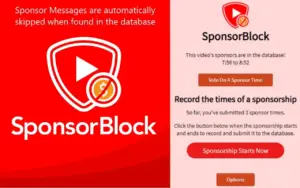
A crowdsourced Safari extension for Mac that jumps over sponsor reads, intros, outros, and similar segments inside YouTube videos by reading timestamps submitted by other viewers, instead of blocking the separate pre-roll ads YouTube serves before playback.

How it works in Safari on Mac

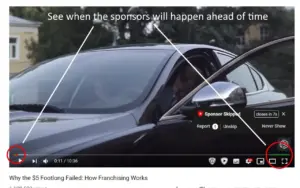
After you install the App Store wrapper and enable the extension under Safari Settings, SponsorBlock injects into youtube.com pages in Safari. When you play a video, it queries a public segment database and seeks past marked ranges—sponsors, self-promotion, subscription reminders, and other categories you enable. You can submit new start and end times, vote on existing segments, and see colored markers on the progress bar. The project is open source; the database is downloadable, and the extension generates a random user ID for reputation and leaderboard features rather than tying skips to your Google account.

What it does and does not block

The developer explicitly states this tool does not remove standard YouTube advertisements and does not affect the native YouTube app—only the website in Safari (and other browsers if you use those builds). For both pre-roll ads and in-video sponsors, many users pair it with a general ad blocker such as AdGuard. It can also skip non-music sections in music videos and jump to highlight moments when segments exist. Channel skip profiles, added in the 6.1 line, let you choose which categories to skip per channel instead of relying on a simple whitelist.

Mac install options

On Mac, the commercial route is SponsorBlock for Safari on the App Store (one-time purchase, Family Sharing supported). The same extension can be built for free from the GitHub release zip using Xcode and Safari’s unsigned-extension workflow documented in the project wiki. macOS 11.0 or later is required; the universal package also runs on iPhone, iPad, and visionOS with the same extension core.

Version 6.1.6

Release 6.1.6 focuses on chapter handling: YouTube creator chapters should display more reliably on the timeline, and a new setting can hide those creator chapters when they clutter the UI. A Chrome-only privacy tweak for dynamic extension URLs does not change Safari behavior. Recent 6.1.x builds before this release fixed segment skipping when a video was scrolled off-screen, restored the options page after deleting custom configs, and added support for YouTube’s newer embed player—changes that ship together in the current Safari extension package when you update to 6.1.6.
SponsorBlock 6.1.6 for Mac Safari auto-skips SponsorBlock for YouTube 6.1.6 — Safari Skip Extension for Mac

Pros & Cons Show details

✅ PROS

  • Crowdsourced segments often remove repetitive sponsor reads automatically, which saves time on long YouTube sessions in Safari without manual seeking.
  • The database and extension source are public, so you can verify how segments are fetched and how submissions are attributed.
  • Category controls and per-channel skip profiles let you keep intros on some creators while still skipping sponsors elsewhere.
  • One-time App Store pricing with Family Sharing is simpler than subscription ad tools for households that only need in-video skip behavior.
  • Building from GitHub remains an option if you prefer not to pay but can follow the Xcode and Safari extension setup steps.

❌ CONS

  • It does not block normal YouTube pre-roll or banner ads, so Safari users still need a separate ad blocker for full ad reduction.
  • It only modifies youtube.com in Safari and does not work inside the standalone YouTube app on Mac or iOS.
  • Segment quality depends on community submissions, so new or niche videos may play sponsors until someone marks them.
  • The Mac App Store build is a paid wrapper around free open-source code, which some users dislike even though self-building is documented.
  • English is the only listed App Store language, and YouTube layout changes sometimes require extension updates before skips work reliably again.
✅ What's New in 6.1.6 Show details
  1. YouTube chapter timeline — version 6.1.6 fixes cases where creator chapters sometimes failed to appear on the video progress bar in Safari.
  2. Hide creator chapters — a new option in 6.1.6 lets you hide creator-uploaded chapter markers when they overlap with or clutter SponsorBlock’s own segment UI.
  3. Dynamic extension URL (Chrome) — 6.1.6 enables a more private dynamic extension URL pattern on Chromium builds; Safari on Mac is unaffected by this browser-specific change.
  4. Scroll-away skip fix — release 6.1.5 repaired segments that stopped skipping when the video player was scrolled off-screen on YouTube’s layout.
  5. New embed player — 6.1.4 added compatibility with YouTube’s newer embed player so skips work on embedded videos, not only the main watch page.

Older Versions

Installation & Troubleshooting FAQ

8 questions

Common issues when installing macOS apps

Alternatives

Join the Conversation

Your email address will not be published. Required fields are marked *