Widgetter
A Mac desktop widget suite that turns your wallpaper into a configurable dashboard—system stats, calendar, weather, stocks, tasks, and music controls arranged with custom sizes, colors, and always-on-top panels.
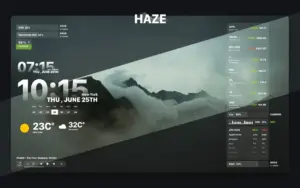
Widgetter (listed on the Mac App Store as Widgetter – Custom Desktop; catalog builds often emphasize the system-stats lineup) from Villow / Bitnite LLP targets Mac users who want iStat Menus–style visibility without living in the menu bar alone. Floating widgets show CPU load, fan RPM, RAM use with heavy apps listed, HDD or SSD free space, battery level, network throughput, date and time, mini calendar, weather, currency and crypto quotes, Reminders, and a simple music player. You pick which modules appear, resize them freely, tweak fonts and colors, group layouts, and pin critical widgets above other windows.
Typical Mac workflow
On an Apple silicon Mac running macOS Ventura or later, add CPU and RAM widgets while compiling or editing video, keep a weather tile for travel days, and stack calendar plus tasks beside a 4K wallpaper theme from the built-in skin gallery. Multiple instances of the same widget type support different cities or stock lists. The app warns when metrics look unhealthy according to vendor copy. Widgetter is free to download with in-app purchases to remove watermarks and unlock subscription or one-time Pro tiers (pricing varies on the store listing).
The install is large (about 280 MB) because of wallpaper and theme assets. Privacy notes indicate identifiers, usage, and diagnostics may be collected but not linked to your identity. The product is Mac-only in this SKU; a separate Windows build exists under the Widgetter brand but is not this App Store app.
Version 2.4.1
Release 2.4.1 (June 19, 2026) is a maintenance update: the Mac App Store What’s New text lists only minor bug fixes, with no detailed changelog. Version 2.4 introduced the current widget and theme line on the 2.x branch; 2.4.1 refines stability rather than adding new widget types.