Sketch
A native macOS design platform for UI and product work—vector editing, reusable Symbols, shared Libraries, and interactive prototypes in one app tied to Sketch Workspace.
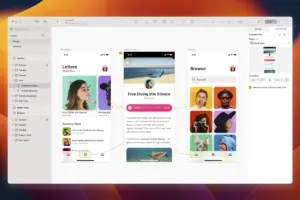
Sketch remains a Mac-first choice for interface designers, design-system owners, and product teams who need precise layout control without leaving the desktop. You work on an infinite Canvas with frames, components, text, and vector tools; Symbols and Libraries keep repeated UI consistent across files; prototyping links frames into flows you can preview and share. Collaboration, version history, and cloud documents run through Sketch Workspace, which requires an active subscription after the trial period.
Typical Mac workflow
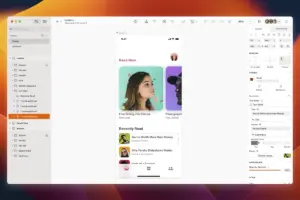
Most teams start from a Library of buttons, inputs, and navigation patterns, then compose screens as frames on pages. Designers tweak overrides on Symbol instances, export assets at @1x/@2x/@3x, and hand off CSS-friendly values or inspect specs in the web viewer. Prototype mode connects hotspots and transitions so stakeholders can click through flows in the Preview window or in a browser. When a system grows large, Replace Library and bulk property edits matter as much as drawing speed—Edinburgh targets exactly those bottlenecks.
Sketch is not a photo editor or a 3D suite; its strength is structured UI production. You will get the most from it if your team already standardizes on Symbols, color variables, and shared Libraries rather than one-off flat layers. The Mac app expects macOS Sonoma (14.0) or newer according to the vendor; older releases of Sketch supported earlier macOS versions, but 2026.2.0 follows the current Sonoma floor. The app runs as native Mac software on Apple Silicon and Intel Macs that meet that requirement.
What Edinburgh (2026.2.0) changes for daily use
Release 2026.2.0—codename Edinburgh—is Sketch’s second major 2026 Mac update. Multi-paste lets you Paste, Paste Over, or Paste and Replace across several selected frames, groups, or layers at once, and paste placement is more predictable when targeting groups or the Canvas. Gradients gain Perceptual (Oklab) and Vibrant (Oklch) interpolation alongside Classic RGB, with CSS export and previews reflecting your choice. Copy Properties (⌥⌘C) broadens to fills, borders, shadows, effects, size, position, and prototyping interactions, so you can paste only what you need. Symbol instances move and resize roughly twice as fast in vendor testing, and Replace Library is dramatically faster on heavy Libraries. Prototype Preview adds Follow Selection and Float on Top options, quicker sharing, and clearer frame picking. The release also ships dozens of Inspector, export, and Symbol fixes documented in the official notes.
Licensing and fit
Sketch is sold through Workspace subscriptions (trial available); there is no perpetual license for new customers in the current model. Edinburgh is a worthwhile update if you live in Symbols, Libraries, gradients, or prototype review; it is less relevant if you only need occasional static mockups and rarely touch shared systems. For teams already on Sketch, 2026.2.0 is the current feature line that builds on the earlier 2026.1 Dublin release rather than replacing it.