
Mole 1.8.0 for Mac

Mole
Name:Mole 1.8.0 CRACKFIX [EDiSO].iso.torrent (20 MB)
Hash:8e815a2e0bb1c560be2b39566f55bbfdfea9c350
Review by:
Downloads 266
Rating
4.2 22 Click to rate
Checked
   Download Torrent Download Now

Mole — cleanup, apps, and live status on Mac

A native macOS utility that combines cache cleaning, app updates and uninstall, maintenance, disk treemap analysis, and a live Status dashboard with a menu bar HUD in one SwiftUI app.

Developed by Tw93, Mole for Mac builds on the open-source Mole CLI’s safety rules but adds visual workflows the terminal tool cannot offer: review-first cleanup across eleven cache categories, Software management for Sparkle, Homebrew, App Store, and Electron updates, one-tap Optimize maintenance, Jupiter treemap disk analysis, and a Status page with CPU, memory, GPU, network, battery, and fan metrics. Processing stays local; the developer states the app collects no analytics on scanned files.

Typical Mac workflow

Most users open Clean to scan Xcode, browser, developer, and AI tool caches, untick anything they want to keep, then confirm deletion after reviewing the file list and byte count. Software checks for app updates and startup items; Analyze drills into large folders; Status and the menu bar HUD show live metrics without opening the main window. Optional Full Disk Access reaches deeper App Support and container caches when you need a more thorough scan.

Version 1.8.0

Released June 22, 2026, build 1.8.0 adds Battery Care for supported MacBooks, holding charge near 80% and resuming below 75% while Mole runs. Fan presets on Apple Silicon no longer require sudoers setup and return to Auto more reliably. Optimize, Software updates, Status, Clean, Uninstall, and Analyze each received targeted speed, grouping, and reliability improvements documented in the official Sparkle release notes.

Licensing and requirements

Mole requires macOS 14.0 or later and costs $19 as a one-time purchase with lifetime updates, two Macs per license, and a 14-day refund. Each destructive tool works twice for free; scanning is always free. Install from mole.fit or brew install --cask mole-app. The separate Mole CLI remains free and open source under MIT on GitHub.

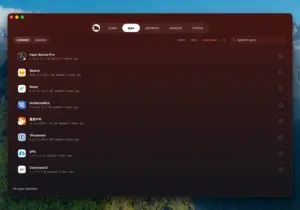
Mole 1.8.0 on Mac cleans caches, manages apps Mole 1.8.0 for Mac — Cleanup & System Utility

Pros & Cons Show details

✅ PROS

  • Mole replaces several paid utilities by combining cleanup, uninstall, disk treemap analysis, optimization, and system monitoring in one native Mac app.
  • Review-first cleanup shows every file and byte count before deletion, with conservative defaults and optional whitelists inherited from the CLI safety model.
  • Version 1.8.0 adds Battery Care for supported MacBooks, which can reduce time spent at a full charge during long plugged-in sessions.
  • The menu bar HUD, Privacy Check for camera and microphone use, and Status sparklines provide monitoring without a separate iStat-style subscription.
  • A one-time $19 license includes lifetime updates for two Macs, while the companion CLI stays free for terminal-first users.

❌ CONS

  • The Mac GUI app is paid after a limited free trial per tool; the full feature set is not permanently free like the CLI.
  • Battery Care and fan control require a signed helper and admin approval, and fan presets are simplified Auto, Cool, and Max modes rather than custom curves.
  • Version 1.8.0 is a large maintenance and polish release across many modules rather than a single headline feature beyond Battery Care.
  • Deeper cleanup benefits from Full Disk Access, which adds another permission step cautious users may prefer to skip.
  • The Mac app and CLI use different version numbers and release channels, which can confuse users who follow GitHub CLI releases only.
✅ What's New in 1.8.0 Show details
  1. [Battery Care] — On supported MacBooks, Mole holds charging near 80% and resumes below 75% while running, sharing one signed helper with fan control so a single admin approval covers both.
  2. [Apple Silicon fan control] — Fan presets no longer depend on a sudoers setup, and Mole returns to Auto reliably after failures, relaunches, or helper updates.
  3. [Optimize workflow] — Visible fixes for Dock, input switching, iCloud Drive, AirDrop, Spotlight, and Notification Center run first, with deeper maintenance grouped into clearer summary sections.
  4. [Software updates] — Apps in external Applications folders appear in update checks; Update All installs supported updates sequentially with live progress and cleaner App Store version filtering.
  5. [Status and menu bar] — Process rows appear sooner, GPU details load in the background, pinned processes stay put, network speed refreshes every second, and new installs enable the menu bar runner by default.
  6. [Analyze performance] — The disk view opens on the whole-disk overview, renders large treemaps first, shows real app bundle icons, and folds tiny cells into Other to avoid stalls on huge folders.
  7. [Clean and Uninstall polish] — Clean shows scan sections immediately with steady completion totals; Uninstall pre-scans on hover and states plainly when every item is skipped.
  8. [Everyday tools] — Keep Screen On gains longer durations and works with the lid closed; Clean Screen waits for the exit shortcut release; manual update refresh bypasses stale catalogs.
  9. [Fit and finish] — RunCat joins menu bar runners, the app icon adapts to Dark Mode, keyboard focus stays visible, and DMG downloads carry proper disk-image headers.

Installation & Troubleshooting FAQ

8 questions

Common issues when installing macOS apps

Alternatives

1 Comment

Join the Conversation

Your email address will not be published. Required fields are marked *