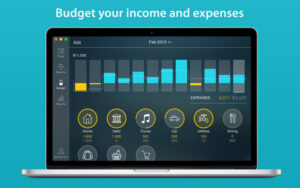
What Money Pro does on Mac
Money Pro is a personal finance app for macOS that combines bill planning, budgeting, account tracking, and reporting in one place for household and small-business money management.
Developed by iBear LLC, Money Pro is the successor to the long-running Money app with over two million downloads worldwide. On Mac you schedule recurring bills on a calendar, set income and expense budgets with rollover, maintain checkbook-style registers across unlimited accounts, reconcile cleared transactions, and attach receipt photos. Import OFX or CSV bank statements, split transactions across categories, and run reports for cash flow, net worth, and trends.
Typical Mac workflow
Most users set up accounts and categories, enter or import transactions, then review the Today view for upcoming bills and budget progress bars for overspending. Bill reminders alert you before due dates, and you can reschedule payments quickly. Multiple profiles separate personal and family finances. Optional Money Pro Sync shares data across Mac, iPhone, iPad, Windows, and Android when you subscribe to PLUS or GOLD tiers.
Version 2.11.29
Build 2.11.29 is a maintenance release on the Mac App Store. iBear’s What’s New text lists only unspecified minor bug fixes with no detailed changelog on the developer blog or website. This update appears focused on stability rather than new features. Money Pro 3.0 with a redesigned interface is in development separately according to the developer FAQ.
Licensing and requirements
Money Pro for Mac requires macOS 12.0 or later and costs $0.99 on the Mac App Store with optional PLUS and GOLD in-app subscriptions for sync, goals, online banking, and AR reports. Subscriptions auto-renew unless canceled in App Store settings. Financial data may be linked to your identity per the privacy label. Password protection and local backups are built in.