
Manet Music 1.0.12 for Mac

Manet Music
Name:Manet 1.0.12 [EDiSO].dmg.torrent (12.04MB)
Hash:8a19b9febfbadf1c9350a9e2f3d1f41981a56d75
Review by:
Downloads 179
Rating
4.3 17 Click to rate
Checked
   Download Torrent Download Now

A native Jellyfin music client for Mac

Manet Music connects to your Jellyfin server and turns your self-hosted library into a polished streaming experience on macOS, iPhone, and iPad.

How it works on Mac

Sign in to your Jellyfin instance, browse artists, albums, and playlists, and stream with direct play for AAC and ALAC when server settings allow. On macOS 15 or later you can search tracks, manage downloads for offline listening, and use the same Liquid Glass–style interface shared with the iOS and iPad builds.

  • Home server users: listen to your own FLAC, MP3, and ALAC collection without a commercial streaming subscription.
  • Commuters: download albums ahead of time when your Jellyfin library is reachable only on home Wi‑Fi.
  • Automation fans: use Siri and Shortcuts to start playback by artist, album, or playlist.

Playback and Manet+

Built-in lyrics, gain normalization, and a six-band equalizer (Manet+) help keep listening consistent across albums. Manet+ also unlocks Mac support, custom app icons, library toggles, and ignored-track rules according to the developer. The base app is free on the App Store; Manet+ is an optional subscription for premium features and Mac access.

Manet Music 1.0.12

Version 1.0.12 requires macOS 15.0 or later on Intel and Apple Silicon Macs. The Mac App Store notes a fix for crashes during playlist migration to the newer GRDB database introduced in v1.0.10; the developer’s public changelog page had not yet listed 1.0.12 at the time of writing.
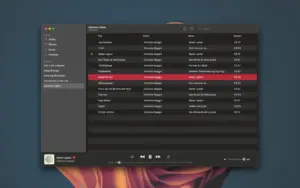

Manet Music 1.0.12 for Mac — Jellyfin Player

Pros & Cons Show details

✅ PROS

  • Manet Music is a purpose-built Jellyfin client rather than a generic browser tab, with native playback, library browsing, and system integrations on Apple platforms.
  • Offline downloads let you keep albums available when your server is unreachable or you want to limit mobile data use.
  • Direct play for AAC and ALAC reduces unnecessary server transcoding when quality settings match the source files.
  • Siri, Shortcuts, CarPlay, lyrics, and gain normalization cover common listening scenarios from desk to car to automation.
  • A shared codebase across iOS, iPadOS, and macOS means Mac users receive feature parity with mobile releases more quickly.
  • Version 1.0.12 addresses a crash during playlist migration, improving stability during the ongoing GRDB database transition.

❌ CONS

  • Manet Music requires your own Jellyfin server; it is not a standalone music service and is useless without backend infrastructure.
  • Mac access requires a Manet+ subscription according to the developer site, so desktop use adds ongoing cost beyond the free app download.
  • The app is distributed only through the Apple ecosystem, which excludes Windows, Linux, and Android Jellyfin users.
  • Version 1.0.12’s public developer changelog lags the App Store listing, making it harder to verify every change in this build from official docs alone.
  • Advanced Jellyfin power features may still be better handled in the Jellyfin web UI or other clients for server administration tasks.
  • Self-hosted playback quality and reliability depend on your network, server hardware, and Jellyfin configuration—not only the Manet app.
✅ What's New in 1.0.12 Show details
  1. Playlist migration crash fix — Fixed a crash when migrating playlists to the new database, per Mac App Store release notes for v1.0.12.
  2. GRDB migration stability — Builds on the GRDB database migration path started in v1.0.10 to improve long-term app stability.
  3. Focused maintenance release — Version 1.0.12 is a small update; the developer’s public release page still documented through v1.0.10 when checked.
  4. Universal Apple release — v1.0.12 ships on the Mac App Store alongside iPhone and iPad builds under the same version number.
  5. Jellyfin playlist reliability — The migration fix helps playlist data survive the backend database transition without crashing the app on launch or sync.

Installation & Troubleshooting FAQ

8 questions

Common issues when installing macOS apps

Alternatives

Join the Conversation

Your email address will not be published. Required fields are marked *