1Capture-Screenshot 1.8.0 for Mac

1Capture-Screenshot
Name:1Capture 1.8.0 [EDiSO].dmg.torrent (271.13MB)
Hash:c800068d597fc3ddf1097991440c806b9b6d7307
Review by:
Downloads 177
Rating
4.2 29 Click to rate
Checked
   Download Torrent Download Now

Screenshot capture with annotation on Mac

1Capture-Screenshot is a macOS utility for taking area, window, and full-screen captures, then annotating and sharing them without leaving a polished editing workflow.

Capture modes and editing

Start capture from the menu bar or a customizable shortcut, then select an area, window, or full screen. The annotation toolbar covers remarks, shapes, mosaics, highlighters, stickers, and quick notes designed for feedback and tutorials. Horizontal and vertical scrolling capture helps with long web pages and documents that do not fit on one screen.

  • Designers: beautify backgrounds and export polished screenshots for presentations.
  • Support teams: pin captures to the desktop and use OCR to copy text from UI shots.
  • Creators: record screen activity and export GIFs for demos and social posts in 1.8.0.

Beyond basic screenshots

Built-in OCR, a color picker, text watermarks, and pin-to-desktop mode extend what macOS screenshots offer out of the box. Custom workflows, a drag-and-drop shelf, and options to save as WebP or copy without exiting edit mode support repeat daily use. An AI erase tool runs on-device on Apple Silicon Macs for removing unwanted objects from captures.

Licensing and platform

The app is free to download with a 7-day trial and optional lifetime in-app purchase; the vendor states paid users receive free upgrades. Privacy documentation indicates no data collection from the app itself.

1Capture-Screenshot 1.8.0

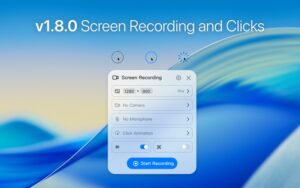
Version 1.8.0 requires macOS 12.3 or later, supports Intel and Apple Silicon, and adds screen recording, three click-animation styles, and GIF recording alongside a fix for save-related crashes documented in the official changelog.
1Capture-Screenshot 1.8.0 is a Mac screenshot app 1Capture-Screenshot 1.8.0 for Mac — Capture & Annotate

Pros & Cons Show details

✅ PROS

  • Area, window, full-screen, and scrolling capture cover most everyday Mac screenshot needs in one app with an integrated editor.
  • Annotation tools—including quick remarks, mosaics, highlighters, and stickers—make feedback and tutorial markup faster than editing in a separate image app.
  • OCR, color picker, pin-to-desktop, and background beautification add practical workflow features beyond the built-in macOS screenshot utility.
  • Version 1.8.0 adds screen recording, click animations, and GIF export, turning 1Capture into a broader capture suite for demos and short clips.
  • Custom workflows, shortcut support, and multi-language UI help teams standardize how screenshots are taken and saved on Mac.
  • The developer reports no app data collection, and lifetime purchase messaging suggests ongoing updates without a mandatory subscription.

❌ CONS

  • 1Capture-Screenshot is Mac-only and requires macOS 12.3 or later, so it cannot replace screenshot tools on Windows or older Macs.
  • Full access depends on in-app purchase after a 7-day trial, and listed lifetime prices may change with App Store promotions.
  • At roughly 275 MB, the app is larger than lightweight screenshot utilities that focus only on static captures.
  • Some advanced features, such as the AI erase tool, are limited to Apple Silicon Macs according to vendor documentation.
  • Screen recording and GIF capture may require additional macOS privacy permissions and can use more disk space than still images.
  • As a newer product in a crowded screenshot market, some planned features—such as screenshot translation and short-link sharing—may still be on the roadmap rather than fully delivered.
✅ What's New in 1.8.0 Show details
  1. Screen recording — Version 1.8.0 adds built-in screen recording so users can capture motion and workflows without a separate recorder app.
  2. Click animations — Three click-animation styles are available to highlight cursor actions in tutorials and demo recordings.
  3. GIF recording — New GIF recording lets you export short animated captures for quick sharing in docs, chats, and social posts.
  4. Support Center — An in-app Support Center was added for help resources and App Store review feedback per the official changelog.
  5. Save crash fix — Fixed crash issues that could occur when saving screenshots, improving stability after annotation and export.
  6. Capture suite expansion — GIF and screen recording complete features previously listed as planned, extending 1Capture beyond static screenshot workflows.

Installation & Troubleshooting FAQ

8 questions

Common issues when installing macOS apps

Alternatives

Join the Conversation

Your email address will not be published. Required fields are marked *