TextSoap 9.7.4 for Mac

TextSoap 8
Name:TextSoap 9.7.4 [TNT].dmg.torrent (27.21MB)
Hash:99da4ffb8d0c9f556ce898dc71c1fbae1385213f
Review by:
Downloads 208
Rating
4.4 16 Click to rate
Checked
   Download Torrent Download Now

Automate text cleanup on your Mac

TextSoap is macOS software that cleans, reformats, and transforms plain or rich text through reusable “cleaners” instead of manual find-and-replace in every app.

Built-in cleaners and custom workflows

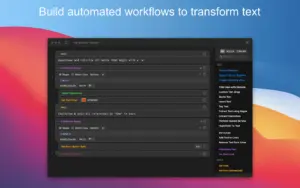
The app ships with more than 100 predefined cleaners for common jobs: trimming whitespace, fixing line breaks, converting HTML to Markdown, sorting lines, and applying title case. When a preset is not enough, the Custom Cleaner Editor chains actions—find/replace, regex, conditionals, list processing, and line-by-line steps—into saved workflows you can reuse across projects.

  • Writers and editors: normalize pasted copy from the web, email, or PDFs.
  • Developers: reformat SQL, logs, or data files with repeatable cleaners.
  • Researchers: batch-clean large sets of downloaded text files.

Where TextSoap fits in your workflow

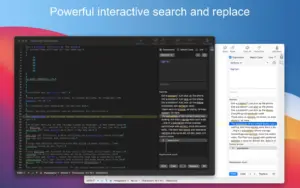
TextSoap includes a capable text editor with line numbers, invisible characters, and statistics, but most users run cleaners on text copied from other apps. The free companion textsoapAgent adds system-wide access through the TextSoap Menu, macOS Services, global hotkeys, and AppleScript—so cleanup can happen inside Mail, Notes, browsers, and code editors without switching apps.

Groups, libraries, and batch jobs

Custom groups organize cleaners for specific tasks, and library import/export lets you share setups with a team. Batch File Cleaning applies chosen cleaners to many files at once, which helps when a folder of documents needs the same transformation.

TextSoap 9.7.4 on your Mac

Version 9.7.4 requires macOS 11 or later, runs natively on Apple Silicon, and supports Dark Mode. This build is a maintenance release focused on editor stability, preferences layout, and Clipboard Workspace behavior; licensing is per-user with a free trial from the vendor site or optional Setapp subscription.
TextSoap 9.7.4 cleans and transforms text on Mac with 100 TextSoap 9.7.4 for Mac — Text Cleanup & Automation

Pros & Cons Show details

✅ PROS

  • More than 100 built-in cleaners cover everyday text problems so most cleanup tasks need no scripting or manual regex work.
  • The Custom Cleaner Editor lets you build multi-step workflows with lists, conditionals, and per-line actions for complex, repeatable transformations.
  • textsoapAgent integrates TextSoap into other Mac apps via Services, hotkeys, and AppleScript for system-wide cleanup without leaving your current window.
  • Native Apple Silicon support and Dark Mode make the app feel at home on current Mac hardware and appearance settings.
  • Batch File Cleaning and library import/export are practical when you must process many files or share cleaner setups across machines.
  • Groups and the Clipboard Workspace give quick access to the cleaners you use most for a given project or paste workflow.

❌ CONS

  • TextSoap is Mac-only, so Windows or Linux users cannot use it as part of a cross-platform text workflow.
  • Full use requires a paid license (individual or family pack) or a Setapp subscription after the trial period ends.
  • Advanced custom cleaners and regex actions have a learning curve that may feel overwhelming compared with simpler one-shot utilities.
  • Version 9.7.4 is a small maintenance update, so users expecting major new features in this build will find mostly bug fixes.
  • Reliable system-wide Agent behavior may require initial setup in Settings and at least one standard app launch after major updates.
  • Highly specialized text tasks may still need a dedicated editor or script if TextSoap’s action library does not match your format exactly.
✅ What's New in 9.7.4 Show details
  1. Custom cleaner editor stability — Fixed a hang or crash in the custom cleaner editor that could occur under certain conditions during workflow editing.
  2. Preferences layout — Resolved layout issues in Preferences > General so settings display correctly on more screen sizes and themes.
  3. Clipboard Workspace group refresh — New custom groups now appear in the Clipboard Workspace immediately without relaunching TextSoap.
  4. Holiday dock icons removed — Custom dock icons that displayed a US flag on June 14 and July 4 were removed from this build.
  5. macOS 11+ compatibility — TextSoap 9.7.4 (build 3264) continues to support macOS 11 or later, including recent macOS releases documented by the vendor.

Older Versions

Version Publication date
TextSoap v9.7.4 Latest Current
TextSoap v9.7.1
TextSoap v9.7.0
TextSoap v9.6
TextSoap v9.4.2
TextSoap v9.4.1
TextSoap v8.6.3
TextSoap v8.6.2
TextSoap v8.6.1
TextSoap v8.6
TextSoap v8.3
TextSoap v8.2.1
TextSoap v8.2

Installation & Troubleshooting FAQ

8 questions

Common issues when installing macOS apps

Alternatives

Join the Conversation

Your email address will not be published. Required fields are marked *