ForkLift 4.6.4 for Mac

ForkLift
Name:ForkLift 4.6.4 [TNT].dmg.torrent (13.26MB)
Hash:beb7521478b861120bfda12e1463b77994d52b6c
Review by:
Downloads 198
Rating
4.4 19 Click to rate
Checked
   Download Torrent Download Now

What ForkLift does on Mac

ForkLift 4 is a dual-pane file manager and transfer client for macOS from BinaryNights that combines Finder-style browsing with FTP, SFTP, cloud drives, and folder synchronization in one native app.

ForkLift targets Mac users who outgrow Finder for daily file work: developers moving code to servers, designers syncing asset folders, and admins managing S3 buckets or NAS shares. Two side-by-side panes let you drag files between local disks and remote volumes, queue transfers, and compare folders before syncing.

Connection and transfer options

  • Local volumes, iCloud, and network shares via SMB, AFP, and NFS
  • SFTP, FTP, and WebDAV servers
  • Amazon S3, Backblaze B2, Google Drive, OneDrive, Dropbox, and Rackspace Cloud Files
  • Transfer queues with bandwidth limits, conflict rules, and reorderable jobs
  • Remote file editing with automatic upload when you save in your preferred editor

File management tools

  • Folder sync with one- or two-way rules and saved favorites
  • Search and filter by name, extension, kind, tags, or content on local and remote paths
  • Quick Select to build selections by typing filenames, extensions, or tags
  • Batch rename presets and archive handling for zip and other formats
  • Preview panel for images, PDFs, audio, video, and in-place text editing
  • Git integration, checksum tools, and comparison with external diff apps

Typical Mac workflow

Connect a production SFTP site in one pane and keep your local project in the other, then drag changed files across and let ForkLift queue uploads. Use Sync favorites to mirror a Dropbox or S3 folder on a schedule. Tag autocompletion from version 4.6 speeds metadata work; custom toolbar tools from Settings give one-click access to shell scripts you define.

Version 4.6.4

Build 4.6.4, released June 16, 2026, is a usability-focused patch. Quick Select now matches accented characters in filenames, and Go to Folder resolves aliases and symlinks. Settings warn before theme deletion, Column View rename scrolling is fixed, and Sync is disabled while a pane is in search mode to avoid conflicting operations.

Licensing and requirements

ForkLift 4.4 and later require macOS 14.6 Sonoma or newer according to BinaryNights support; Tahoe compatibility is documented from 4.3.4 onward. Licenses are lifetime purchases with one or two years of included updates (about $19.95 for a single user); after the update period you keep the last licensed version indefinitely. ForkLift is also available through Setapp. A free trial is offered on the vendor site.
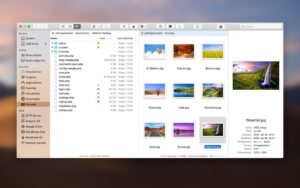
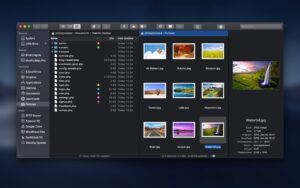
ForkLift 4.6.4 is a dual-pane Mac file manager and transfer client for local disks and cloud storage. Build 4.6.4 improves Quick Select ForkLift 4.6.4 for Mac — Dual-Pane File Manager

Pros & Cons Show details

✅ PROS

  • ForkLift merges dual-pane local browsing with SFTP, S3, and major cloud providers, which reduces the need for separate FTP and cloud clients on Mac.
  • Folder sync with saved favorites and faster analysis than ForkLift 3 suits routine backup and deployment workflows between local and remote paths.
  • Remote edit support uploads saved changes automatically, which helps developers treat server files like local documents.
  • Version 4.6.4 improves Quick Select for accented filenames and Go to Folder for symlinks, which helps on international file trees and complex directory layouts.
  • Native macOS design with custom themes, iCloud-synced favorites, and optional Setapp access fits power users who want a Finder replacement without Electron overhead.

❌ CONS

  • Version 4.6.4 is a small navigation and stability patch, not a major feature release.
  • Lifetime licenses include only one or two years of free updates; continuing on the latest builds after that requires purchasing a new license.
  • ForkLift 4.4+ requires macOS 14.6 or later, which excludes Macs stuck on older macOS versions.
  • The learning curve is steeper than Finder for casual users who only need occasional file copies.
  • Some cloud and server setups need manual connection configuration and troubleshooting through BinaryNights support documentation.
✅ What's New in 4.6.4 Show details
  1. [Quick Select accented letters] — Version 4.6.4 lets Quick Select match filenames that contain accented characters, making selection faster on non-ASCII file names.
  2. [Go to Folder symlinks and aliases] — The Go to Folder dialog now recognizes and navigates to aliases and symbolic links across the file system.
  3. [Theme deletion warning] — Settings show a confirmation before deleting a custom theme to prevent accidental loss of appearance presets.
  4. [Column View rename fix] — Column View no longer lets the selected filename float over other items while scrolling during rename mode.
  5. [Sync disabled during search] — The Sync command is inactive while one pane is in search mode, avoiding sync actions against incomplete result sets.
  6. [Path bar and shortcut fixes] — Build 4.6.4 corrects path bar inconsistencies, restores the Quit and Keep Windows keyboard shortcut in Settings, and fixes a possible hang when switching themes.

Older Versions

Version Publication date
ForkLift v4.6.4 Latest Current
ForkLift v4.6.0
ForkLift v4.5.1
ForkLift v4.5.0
ForkLift v4.4.5
ForkLift v4.4.4
ForkLift v4.4.3
ForkLift v4.4.2
ForkLift v4.4.1
ForkLift v4.4.0
ForkLift v4.3.5
ForkLift v4.3.4
ForkLift v4.3.3
ForkLift v4.3.2
ForkLift v4.3.1
ForkLift v4.3.0
ForkLift v4.2.9
ForkLift v4.2.5
ForkLift v4.2.4
ForkLift v4.2.3
ForkLift v4.2.1
ForkLift v4.1.9
ForkLift v4.1.8
ForkLift v4.1.7
ForkLift v4.1.6
ForkLift v4.1.5
ForkLift v4.1.4
ForkLift v4.1.3
ForkLift v4.1.2
ForkLift v4.1.1
ForkLift v4.1.0
ForkLift v4.0.7
ForkLift v4.0.6
ForkLift v4.0.5
ForkLift v4.0.4
ForkLift v4.0.3
ForkLift v3.5.8
ForkLift v3.5.6
ForkLift v3.5.5
ForkLift v3.5.3
ForkLift v3.5.2
ForkLift v3.5.1
ForkLift v3.4.4
ForkLift v3.4.3
ForkLift v3.4.1
ForkLift v3.4
ForkLift v3.3.4

Installation & Troubleshooting FAQ

8 questions

Common issues when installing macOS apps

Alternatives

Important

Mount the image and launch Open Gatekeeper Friendly.

Press Enter to bypass Gatekeeper in the Terminal window.

Drag the application to the Applications folder.

WARNING! SIP must be disabled. Learn more >

Compatibility
macOS 12 and later

Architecture
x86 (64-bit)

Join the Conversation

Your email address will not be published. Required fields are marked *