BlueHarvest 8.5 for Mac

BlueHarvest MAC
Name:BlueHarvest 8.5 [TNT].dmg.torrent (6.8MB)
Review by:
Downloads 471
Rating
4.7 22 Click to rate
Checked
   Download Torrent Download Now    Download Link

BlueHarvest 8.5 for Mac

BlueHarvest is a background utility from Ross Tulloch (zeroonetwenty) that keeps non-Mac disks clean of macOS metadata. When you copy to a USB stick, SD card, NAS share, or client deliverable, Finder often leaves behind .DS_Store files, ._ AppleDouble sidecars, and related folders—BlueHarvest removes them as they appear or on demand.

Who needs it

  • Video editors handing ProRes or project folders to Windows suites
  • Developers and IT staff maintaining cross-platform file servers
  • Anyone tired of explaining “hidden Mac files” on shared drives
  • Users who zip folders for Windows recipients and want metadata stripped from the archive

How it runs

After setup, BlueHarvest watches configured volumes and deletes targeted items automatically—set-and-forget style. For a one-off cleanup, Control-click a disk or folder in Finder and choose Clean using BlueHarvest. The Clean and Eject workflow cleans metadata and ejects removable media; version 8.4 improved reliability of that path.

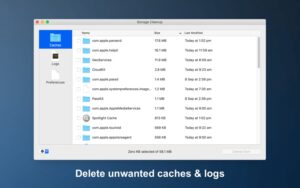
From version 8 onward, Storage Cleanup also targets app caches and log files on your Mac to reclaim local space—a separate concern from external-disk metadata, but bundled in the same app.

What gets removed

  • .DS_Store and ._ AppleDouble resource forks
  • .AppleDouble, .Trashes, .Spotlight, .fseventsd, .TemporaryItems, and related items (per your preferences)
  • Optional __MACOSX folders in zip workflows (off by default in recent builds)
  • System Volume Information folders on Windows-oriented volumes (8.4+)

On macOS 10.14 Mojave and later, grant Full Disk Access in System Settings if you want .Spotlight and .Trashes folders removed—documented on the vendor site.

Version 8.5

Released 1 June 2026: support for disks mounted under the user Application Support folder, and a prompt to request a new free serial when old version 6 keys are used on Apple Silicon Macs. Requires macOS 10.15.4 or later; universal Intel and Apple Silicon builds. About $14.95 for a single-user license after a 30-day trial.

Pros & Cons Show details

✅ PROS

  • Automatic cleanup stops .DS_Store and ._ files from polluting client USB drives and NAS shares without manual Terminal scripts.
  • Finder context-menu cleaning and zip archive scrubbing fit quick deliverables before handoff to Windows teams.
  • Clean and Eject helps safely unmount removable media after metadata removal, with steady improvements across 8.2–8.4.
  • Version 8 adds Storage Cleanup for local caches and logs, addressing disk space on the Mac itself.
  • One-time purchase, 30-day trial, and broad language support suit solo editors and small studios better than subscription cleaners.

❌ CONS

  • It solves macOS metadata habits, not general disk janitor needs—large duplicate finders or full system cleaners are outside its scope.
  • Full Disk Access is required for some folder types (.Spotlight, .Trashes), which may concern privacy-conscious users.
  • Version 6 serial holders on Apple Silicon must request a new free key in 8.5—a one-time migration step.
  • Aggressive blacklist or cleanup rules can delete items you meant to keep if preferences are misconfigured; read the How To first.
  • macOS 10.15.4 minimum excludes very old Macs still on Mojave or earlier without upgrading.
✅ What's New in 8.5 Show details
  1. [Application Support mounts] — Disks mounted in the user Application Support folder are now supported for metadata cleanup workflows.
  2. [Apple Silicon v6 serial prompt] — Users with original version 6 serials on Apple Silicon Macs are prompted to request a new free serial for continued compatibility.
  3. [8.5 maintenance on 8.4 base] — Builds on 8.4’s better delete error reporting, more reliable Clean and Eject, optional __MACOSX removal, and System Volume Information folder handling.
  4. [June 2026 release] — Documented as Version 8.5 on the vendor release-notes page.
  5. [macOS 10.15 through Tahoe] — Product line remains aimed at macOS 10.15 to macOS 26 Tahoe per zeroonetwenty site copy.

Older Versions

Version Publication date
BlueHarvest v8.5 Latest Current
BlueHarvest v8.4
BlueHarvest v8.4.0
BlueHarvest v8.3.0
BlueHarvest v8.2.0
BlueHarvest v8.1.4
BlueHarvest v8.1.3
BlueHarvest v8.1.2
BlueHarvest v8.1.0
BlueHarvest v8.0.12
BlueHarvest v8.0.11
BlueHarvest v8.0.9
BlueHarvest v8.0.8
BlueHarvest v8.0.7
BlueHarvest v8.0.6
BlueHarvest v8.0.5
BlueHarvest v8.0.4
BlueHarvest v8.0.3
BlueHarvest v8.0.2
BlueHarvest v8.0.1

Installation & Troubleshooting FAQ

8 questions

Common issues when installing macOS apps

Alternatives

Join the Conversation

Your email address will not be published. Required fields are marked *