

Swift Publisher 5.7.6 for Mac
Swift Publisher is desktop publishing software from BeLight Software for macOS. You lay out print-ready pages—brochures, flyers, business cards, labels, disc covers, calendars—in a visual editor without the learning curve of professional DTP suites.
Typical projects
- Bi-fold and tri-fold brochures, catalogs, and newsletters
- Business cards and social-media-sized graphics
- Address labels, envelopes, and barcode or QR sheets
- CD/DVD labels and jewel-case inserts
- Booklets with imposition handled inside the app
How you work in the app
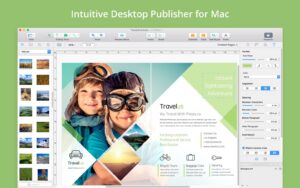
Start from one of 500+ templates or a blank document. Drag photos from Apple Photos, iTunes, or Finder folders. Add text boxes, circular text for disc designs, vertical text, and flowing linked boxes for multi-column layouts. Master pages repeat headers, footers, and backgrounds; unlimited layers keep complex jobs organized in the Inspector.
Design tools include gradients, shadows, smart shapes, over 100 image masks, a built-in Core Image editor, and optional Art Text 4 integration for custom headings. Mail merge pulls names and addresses from Apple Contacts or a text file so you can batch-print labels or badges in one run.
Printing and handoff
- Home printing on Avery, Memorex, Neato, and many other label and card stocks
- Direct-to-disc printing on supported Epson, Canon, HP, and other drives with a disc tray
- Label-roll printers from DYMO, Zebra, Brother, Seiko, Primera, and similar brands
- Export to PDF, TIFF, JPEG, PNG, or EPS with RGB or CMYK, bleed settings, and optional text-to-curves for print shops
Licensing and version 5.7.6
BeLight sells Swift Publisher with a free trial and a one-time purchase (about $19.99 on the vendor site; Mac App Store pricing may differ). It runs on macOS 10.12 or later on Intel and Apple Silicon. Version 5.7.6 (April 2026) mainly fixes a hang on MacBooks with a Touch Bar, plus minor stability improvements—no large feature drop in this build.






ThX Sirena!!!
Mount the image and launch Open Gatekeeper Friendly.
Press Enter to bypass Gatekeeper in the Terminal window.
Drag the application to the Applications folder.
The application is ready to use.
Compatibility
macOS 10.12 and later