
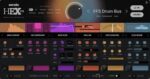
Serato Hex FX v1.2.0 macOS AU VST3
Hex Your Sound
Añade color, energía y movimiento a cada pista con un conjunto completo de efectos encadenables, todo en un solo plugin. Desde ajustes sutiles hasta el caos total, el poder es tuyo.
Every Effect You Can Dream Of
Conjura texturas granuladas, tonos vibrantes y modulación fascinante. Dobla el tiempo, da forma a las reflexiones: cada efecto que puedas soñar, todo en un poderoso plugin.
The Best Sound, Period
El mejor procesamiento de efectos del juego. Sonido de nivel profesional para cada pista, siempre. Desbloquea nuevas texturas, alimenta tu creatividad y mantén tu flujo fuerte, todo con un control sin esfuerzo.
Customize Every Element
Ajusta cada parámetro de efectos con precisión, reorganiza las cadenas y esculpe preajustes personalizados para crear tu sonido característico.
Presets From the Pros
Acelera tu camino hacia pistas con sonido profesional con acceso exclusivo a preajustes característicos de leyendas de la industria como Guy Lawrence (Disclosure), Lord Finesse, DECAP, Amber Navran (Moonchild), Jake One, Dibia$e, DuckGirl, Kaelin Ellis, Oh Gosh Leotus y Leonard Charles.
Make Your Beats Move
Aumenta la energía con Performance FX. Improvisa, activa y ajusta efectos como Halftime y Rollout en tiempo real para dar a tus beats ese movimiento dinámico y en vivo.
Homepage https://serato.com/hex-fx




I did the above and it still crashes my DAW
any help?? thnaks
So anyone (like me) who had problems crashing the app when launching HexFX. By re-doing the codesign command in terminal worked me. Be weary of adding a space after each command in terminal.
Thank you @cuteglitch for this. All credit go to him and @LiquidClive for re-posting.
1. Navigate to your plugins folder, find “Serato Hex FX”. there is one file in components folder and another file in vst3 folder, so you’ll have to do the following for each.
In Terminal add this:
sudo xattr -cr (then drag the “Serato Hex FX” file in terminal (it will write the path in terminal) press enter followed by your password)
Repeat With This:
sudo xattr -r -d com.apple.quarantine (then drag the “Serato Hex FX” file in terminal (it will write the path in terminal) press enter.
Repeat With This:
sudo codesign –force –deep –sign – (then drag the “Serato Hex FX” file in terminal (it will write the path in terminal) press enter.
It Is Very Important to Have That Space at the End of Each Command. Example Below.
sudo xattr -cr(SPACE)”/Library/Audio/Plug-Ins/VST3/Serato Hex FX.vst3
sudo xattr -r -d com.apple.quarantine(SPACE)/Library/Audio/Plug-Ins/VST3/Serato Hex FX.vst3
sudo codesign –force –deep –sign -(SPACE)/Library/Audio/Plug-Ins/VST3/Serato Hex FX.vst3
This doesnt do nothing 🙁 with my mac tahoe
Could you give us the complete terminal command to get this working.
Hex Fx keeps crashing Ableton.
Thanx
Crashing all DAWs, Ableton, Luna, Logic
AU
sudo codesign -f -s –
No crashes – works perfectly fine!
Ableton, Cubase, Logic
Mac Sequola!
crash Ableton <<live