
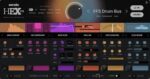
Serato Hex FX v1.2.0 macOS AU VST3
Hex Your Sound
Add color, energy, and movement to every track with a full suite of chainable FX—all in one plugin. From subtle tweaks to full-on chaos, the power’s yours.
Every Effect You Can Dream Of
Conjure gritty textures, vibrant tones, and spellbinding modulation. Bend time, shape reflections—every effect you could dream of, all in one powerful plugin.
The Best Sound, Period
The best FX processing in the game. Pro-level sound for every track, every time. Unlock new textures, fuel your creativity, and keep your flow going strong—all with effortless control.
Customize Every Element
Dial in every FX parameter with precision, rearrange chains, and sculpt custom presets to craft your signature sound.
Presets From the Pros
Fast track your way to pro-sounding tracks with exclusive access to signature presets from industry legends like Guy Lawrence (Disclosure), Lord Finesse, DECAP, Amber Navran (Moonchild), Jake One, Dibia$e, DuckGirl, Kaelin Ellis, Oh Gosh Leotus, and Leonard Charles.
Make Your Beats Move
Turn up the energy with Performance FX. Jam, trigger, and tweak effects like Halftime and Rollout in real time to give your beats that dynamic and live movement.
Homepage https://serato.com/hex-fx



So anyone (like me) who had problems crashing the app when launching HexFX. By re-doing the codesign command in terminal worked me. Be weary of adding a space after each command in terminal.
Thank you @cuteglitch for this. All credit go to him and @LiquidClive for re-posting.
1. Navigate to your plugins folder, find “Serato Hex FX”. there is one file in components folder and another file in vst3 folder, so you’ll have to do the following for each.
In Terminal add this:
sudo xattr -cr (then drag the “Serato Hex FX” file in terminal (it will write the path in terminal) press enter followed by your password)
Repeat With This:
sudo xattr -r -d com.apple.quarantine (then drag the “Serato Hex FX” file in terminal (it will write the path in terminal) press enter.
Repeat With This:
sudo codesign –force –deep –sign – (then drag the “Serato Hex FX” file in terminal (it will write the path in terminal) press enter.
It Is Very Important to Have That Space at the End of Each Command. Example Below.
sudo xattr -cr(SPACE)”/Library/Audio/Plug-Ins/VST3/Serato Hex FX.vst3
sudo xattr -r -d com.apple.quarantine(SPACE)/Library/Audio/Plug-Ins/VST3/Serato Hex FX.vst3
sudo codesign –force –deep –sign -(SPACE)/Library/Audio/Plug-Ins/VST3/Serato Hex FX.vst3
Could you give us the complete terminal command to get this working.
Hex Fx keeps crashing Ableton.
Thanx
Crashing all DAWs, Ableton, Luna, Logic
AU
sudo codesign -f -s –
No crashes – works perfectly fine!
Ableton, Cubase, Logic
Mac Sequola!
crash Ableton <<live