Dropover 5.2.0 macOS
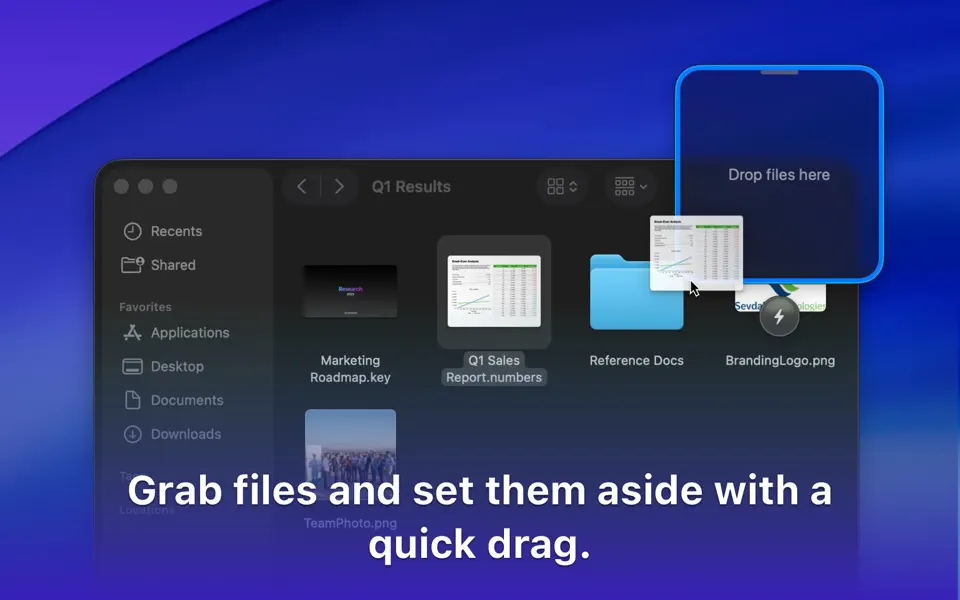
Dropover is a utility that makes it easier to manage and move content between folders, applications, windows and workspaces using Drag and Drop. Shake your cursor and drop whatever you are dragging into the shelf. This shelf floats on top of all your other windows so you can navigate stress-free to your destination folder or program. It works with any draggable content; files, folders, text snippets and even images from a website.
Here’s what you can do with Dropover:
- Activate it using a shake gesture, menubar or global shortcut
- Create multiple shelves or append files to an existing shelf. Then move all files at once to your destination
- Upload dragged files to iCloud or Dropbox and directly get a shareable link copied to your clipboard. All in one click, right from Dropover’s shelf
- Reveal dragged content in Finder or directly share it using Messages, Mail or Airdrop
- Manage and list individual files along with information such as name and file size. Preview them using Quick Look, reveal them in Finder or quickly share them
- Drag individual files to destination
- Remove individual files if you’ve dragged them by accident
- Clear and familiar user interface. Satisfying Drag and Drop experience
If the App does not open, enter in the terminal:
xattr -cr /Applications/Dropover.app && codesign --force --deep --sign - /Applications/Dropover.app
What’s New
Version 5.2.0:
New
- Control Center widgets for common shelf actions, including creating a shelf, opening the Clipboard Shelf, reopening the last shelf, closing all shelves, and docking shelves.
- Redesigned Instant Actions for a faster, more fluid experience.
- Updated app icon for macOS Tahoe, with dark mode and clear/tinted variants.
Improvements
- Dropover Cloud uploads now support up to 100 files as individual uploads; larger uploads are automatically zipped first. File size limits still apply.
- Added a global shortcut to select a shelf, with numbered selection when multiple shelves are visible.
- Shelf keyboard shortcuts now have fewer restrictions during assignment.
- Added “Dock to Nearest Edge” and “Open Detail View” shelf keyboard shortcuts.
- Updated Quick Start guide.
- New option for where newly added files from shortcuts, integrations, or automations are added (new shelf or previous shelf).
- Improved the Instant Actions settings screen.
- The active shelf now shows a pulsing grabber when it’s ready to receive local keyboard shortcuts.
- Smoother animations when a shelf appears or when files are dropped onto it.
- Improved handling when dropping asynchronous files onto a shelf.
- More responsive animations when dragging files out of a shelf.
- Refreshed Settings sidebar icons, including automatic appearance matching.
- Two additional menu bar icon options.
- Improved animations when opening the shelf detail view.
- Improved the legibility and appearance of shelf buttons.
- Refined the Recent Windows widget with minor UI updates.
- Updated the “Drop files here” state.
- Directory picker buttons are now correctly aligned in forms.
Fixes
- Fixed a crash when deleting files in Detail View.
- Fixed several rare stability issues.
- Fixed issues that could cause shelves to stop responding to local keyboard shortcuts in certain cases.
- Fixed a crash that could occur when showing the context menu in shelf detail view.
- Fixed an issue where presented modals might not be focused when they appear.
- Fixed an issue where starting a drag from a shelf could sometimes fail, depending on the initial cursor position.
- Fixed an issue where double-click actions could fail when using tap-to-click on a trackpad.
- Fixed an issue where dragging files out of a shelf could be unavailable when a shelf contained an alias.
- Fixed an issue where some modals wouldn’t close when clicking outside of them.
- Fixed an issue where asynchronous drags for Instant Actions could fail.
- Fixed an issue where asynchronous drops didn’t show a loading indicator on the dropped item.
- Fixed an issue where the Dropover Cloud shortcut could fail when uploading folders.
- Fixed an issue where the Dropover Cloud configuration dialog could trigger autocomplete immediately on appearance.
- Global shortcuts that open a new shelf now use the default shelf location set in Settings.
- Fixed incorrect window padding when using the bottom screen position.
- Fixed an issue where the Recent Windows widget might not load correctly.
- Fixed an issue where some labels wouldn’t update correctly when switching appearance.
- Fixed an issue where certain keyboard shortcuts could accidentally run, or stop working, while you were using another app and the mouse was intersecting with a Dropover shelf.
Compatibility: macOS 13.0 or later.
Homepage https://dropoverapp.com/
Screenshots